
Participant
May 29, 2019
Question

Is it possible to make a table border ruling appear outside the cell?

  • May 29, 2019
  • 2 replies
  • 397 views

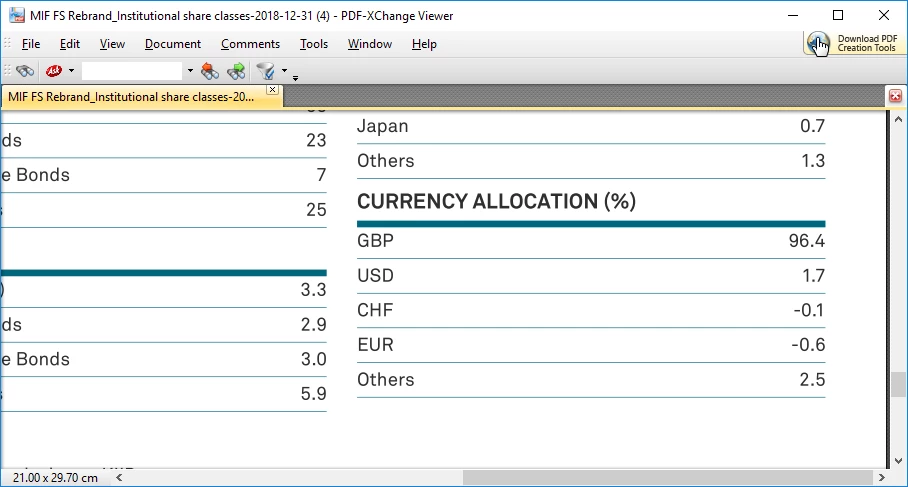
I have a table styling with a thick rule at the top, but as the thick rule is placed inside the cell, it makes the vertical spacing appear inconsistent e.g 'GBP row below has less space above than the other currencies, due to the thick rule taking up the space above. Please don't suggest making the first row a header row and adding extra padding to that styling, that would involve completely re-writing the source data.
    This topic has been closed for replies.

    2 replies

    Barb Binder
    Community Expert
    Community Expert
    May 30, 2019

    Hi Andy:

    The left is what you have, the right is what I think you are looking for?

    The left column is using Custom Ruling & Shading, which encroaches on the spacing for both the cell above and below, though more visible on the cell below the thick rule.

    The second one is using Lin's suggestion of a paragraph tag, but it took some fiddling to make it work:

    1. Start with defining a Frame Below Pfg: Single Line.

    2. On the reference page adjust the single line to be the correct color and thickness. Adjust the frame height to control the spacing between the text and the rule.

    3. Add left/first indents in Basic properties and adjust the cell margins in Table Cell properties:

    Fussy to set up but then you just need to assign the paragraph style.

    Before:

    After:

    ~Barb

    ~Barb at Rocky Mountain Training
    Participant
    May 30, 2019

    Thanks for your helpful suggestions, but unfortunately these tables sometimes appear without a header and sometimes with, so your solution would only be useful in some cases. There are many hundreds of table styles to amend so I was looking for a 'universal' solution that could place the table rule outside the cell, much like in InDesign you can align the stroke to be inside, outside or centred on the drawn shape or cell wall.

    Barb Binder
    Community Expert
    Community Expert
    May 30, 2019

    Hi Andy:

    InDesign (and Illustrator) both offer positioning options for strokes on objects, but InDesign does not offer that option for strokes in tables, either via Cell Options or Table Options.

    That said, when you see the need for a new feature in FrameMaker, the best way to communicate that to the FrameMaker team is via this link: Tracker. This is a community forum—users helping users.

    ~Barb

    ~Barb at Rocky Mountain Training
    LinSims
    Community Expert
    Community Expert
    May 29, 2019

    Add a graphic line to the paragraph tag for CURRENCY ALLOCATION using Frame Below, if CURRENCY ALLOCATION isn't part of the actual table, and remove the top border for your table.