
Known Participant
November 26, 2018
Answered

Is it possible to place colored borders around pages?

  • November 26, 2018
  • 3 replies
  • 537 views

Hi,

I'm wondering if the capability exists in FrameMaker 2017 to place a colored border (similar to the one in this partial image) completely around the white space on a page?  I would like to have a border surrounding the text on the page.  If so, how is it done?

Thanks for any help.

Cheers,

Elizabeth
    This topic has been closed for replies.
    Correct answer Barb Binder

    Hi Elizabeth:

    Yes, you can add repeating graphic objects to the master pages.

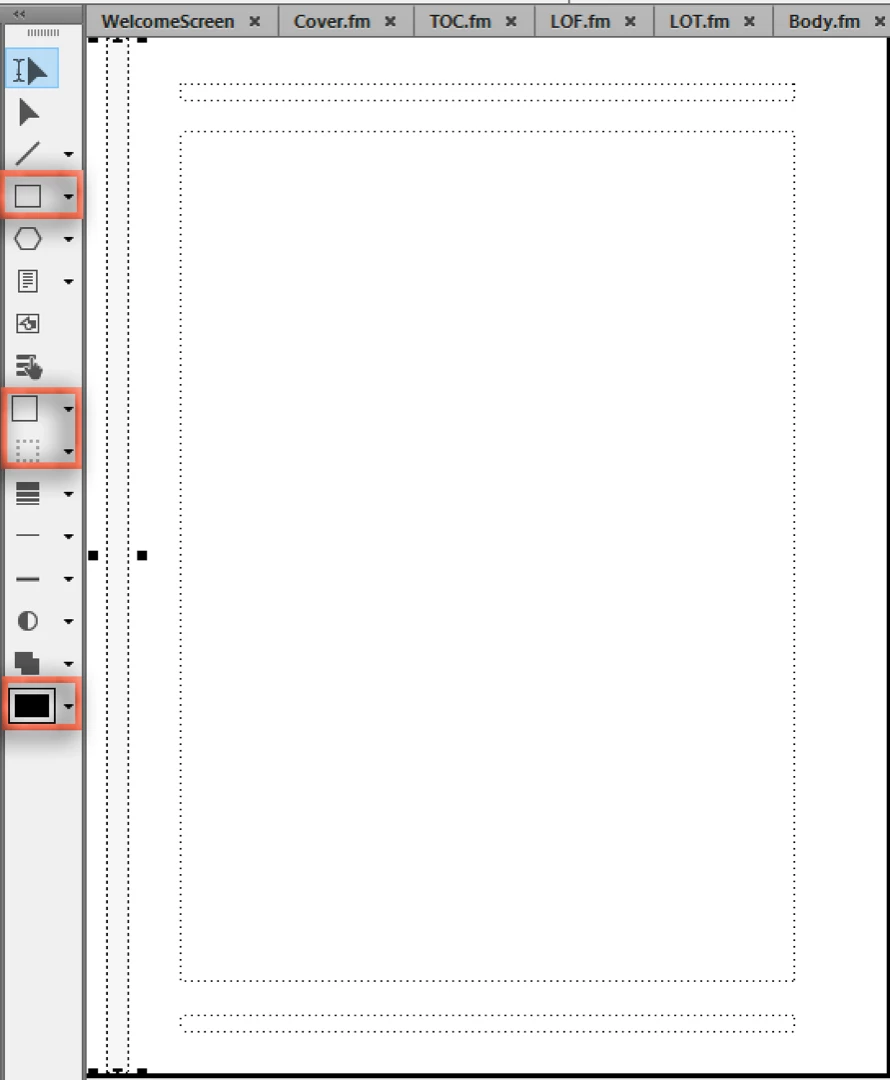
    In your case, it looks like you want a very simple, light gray rectangle so you can create it in FrameMaker using the drawing tools:

    1. View > Master Pages
    2. View > Toolbars > Graphics Toolbar
    3. Select the rectangle tool and draw the shape
    4. Set the Fill Pattern and Pen Patterns
    5. Choose the color
    6. Repeat on the facing page

    ~Barb

    3 replies

    Known Participant
    November 26, 2018

    Thanks very much for your help!

    Elizabeth

    Barb Binder
    Community Expert
    Barb BinderCommunity ExpertCorrect answer
    Community Expert
    November 26, 2018

    Hi Elizabeth:

    Yes, you can add repeating graphic objects to the master pages.

    In your case, it looks like you want a very simple, light gray rectangle so you can create it in FrameMaker using the drawing tools:

    1. View > Master Pages
    2. View > Toolbars > Graphics Toolbar
    3. Select the rectangle tool and draw the shape
    4. Set the Fill Pattern and Pen Patterns
    5. Choose the color
    6. Repeat on the facing page

    ~Barb

    ~Barb at Rocky Mountain Training
    Bob_Niland
    Community Expert
    Community Expert
    November 26, 2018

    On a Master Page, create a rectangular graphics object, offset 0,0, size of page, fill none, border strength and color as desired, run-around off, send to back. Copy to all master pages.

    Known Participant
    November 26, 2018

    Thanks for your help!

    Elizabeth