Lew Yedwab, Resideo
Participating Frequently
May 21, 2025
Answered

Is there a way to change ALL of the paragraph formats to a given font with a single action?

  • May 21, 2025
  • 2 replies
  • 276 views

Using FIND to change every incidence of a now-discredited font is laborious (and I'm not sure I'm catching them all). Is there a way to change EVERY paragraph format to one font (or better yet, font family) in some "global" way? 

    Correct answer frameexpert
    1. Open the Paragraph Designer and go to the Font tab.
    2. From the lower-left gear icon, choose Set Window to As Is. Make sure the Style field is empty.
    3. Change the Family to the desired font family.
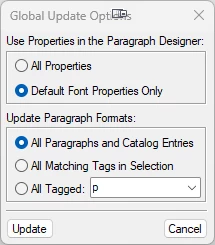
    4. From the gear icon, choose Global Update Options, and select the values below, and click Update.


    2 replies

    frameexpert
    Community Expert
    frameexpertCommunity ExpertCorrect answer
    Community Expert
    May 21, 2025
    1. Open the Paragraph Designer and go to the Font tab.
    2. From the lower-left gear icon, choose Set Window to As Is. Make sure the Style field is empty.
    3. Change the Family to the desired font family.
    4. From the gear icon, choose Global Update Options, and select the values below, and click Update.


    Lew Yedwab, Resideo
    Participating Frequently
    May 21, 2025

    Whoa! Thanks! I will make safety copies of the versions I've already hand-butchered and then try this. 

    Jeff_Coatsworth
    Community Expert
    Community Expert
    May 21, 2025

    Change the Paragraph tag definition to use the desired font then import formats to other files?

    Lew Yedwab, Resideo
    Participating Frequently
    May 21, 2025

    Thank you!