Participant
July 31, 2017
Answered

Is there a way to create a Figure Sheet X of X?

  • July 31, 2017
  • 2 replies
  • 552 views

Is there a way to create a variable, or paragraph format for a figure caption that displays sheet X of X?  I need something to work similar to the Table Sheet variable.

    This topic has been closed for replies.
    Correct answer Barb Binder

    No, it's not built into FrameMaker like the Table Sheet variables are.

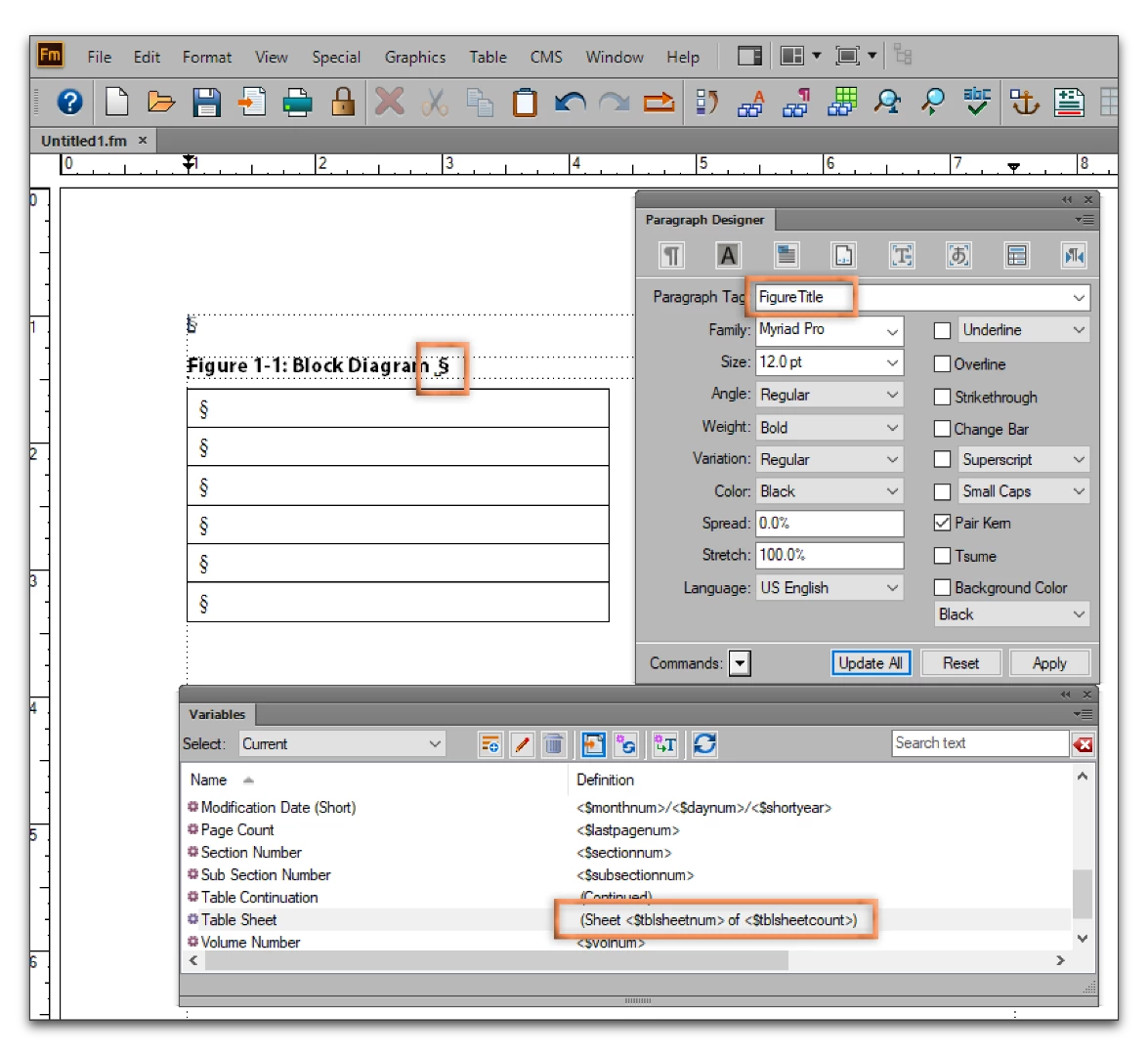
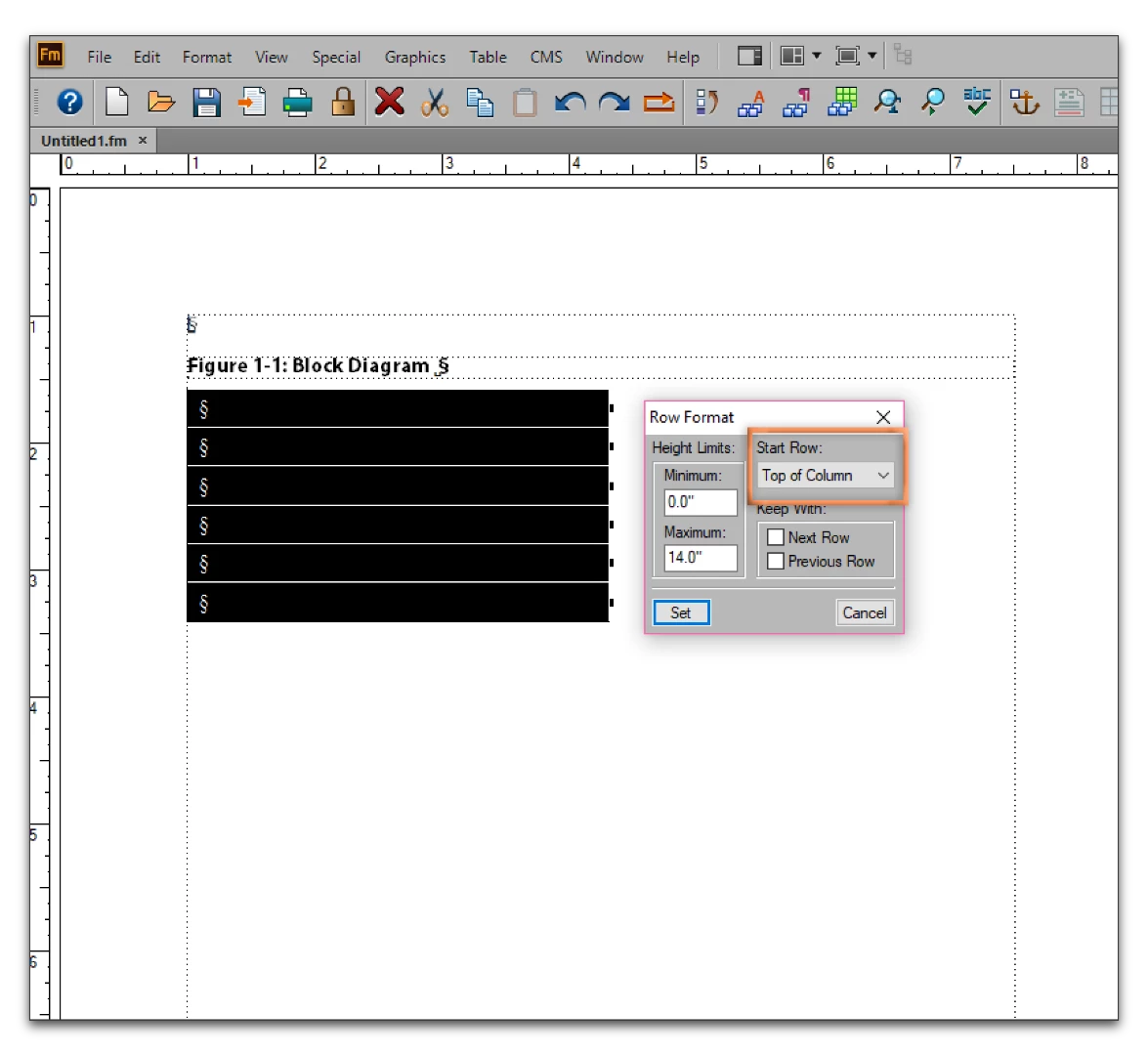
    But you are aware that each table sheet counter starts over for each table, right? So I'm still not clear why you can't use it for both traditional tables, and those holding the figures. The key is in the variable definition—just leave it at the default of (Sheet <$tblsheetnum> of <$tblsheetcount>) so that the wording will work in both situations. Put your title as described in a FigureTitle (you can use any tag above a table), one figure in each body row, set the rows to start at the top of the page.

    Otherwise, I would reconsider the numbering style to take advantage of FrameMaker is meant to handle this: 3-25.1, 3-25.2, 3-25.3 or some variation on that theme. After 30 years in the field, I have learned that it is best if I design around my program's strengths and actively avoid the weaknesses.

    If you just need Adobe to change how FrameMaker works, you can always put in a feature request here: Tracker.

    2 replies

    Participant
    July 31, 2017

    Sorry can't supply and example - I have several figures, falling on several pages, that are continuations of the first, etc.  I need the Caption to read "Figure 3-25. Block Diagram (Sheet 1 of 7)"  I want it to behave the way the Table Sheet variable does - but I get that the table part is what makes it work.  I was hoping that framemaker had a solution for this

    Barb Binder
    Community Expert
    Barb BinderCommunity ExpertCorrect answer
    Community Expert
    July 31, 2017

    No, it's not built into FrameMaker like the Table Sheet variables are.

    But you are aware that each table sheet counter starts over for each table, right? So I'm still not clear why you can't use it for both traditional tables, and those holding the figures. The key is in the variable definition—just leave it at the default of (Sheet <$tblsheetnum> of <$tblsheetcount>) so that the wording will work in both situations. Put your title as described in a FigureTitle (you can use any tag above a table), one figure in each body row, set the rows to start at the top of the page.

    Otherwise, I would reconsider the numbering style to take advantage of FrameMaker is meant to handle this: 3-25.1, 3-25.2, 3-25.3 or some variation on that theme. After 30 years in the field, I have learned that it is best if I design around my program's strengths and actively avoid the weaknesses.

    If you just need Adobe to change how FrameMaker works, you can always put in a feature request here: Tracker.

    ~Barb at Rocky Mountain Training
    Participant
    July 31, 2017

    Well I was able to make it work by embedding the graphic in a table with the title below the table.  Then used my Figure Caption tag with the Table Sheet variable.  I guess I was hoping for a tidier solution.  Thanks for all the assistance.

    Barb Binder
    Community Expert
    Community Expert
    July 31, 2017

    Can you put the figure in a table? That's a pretty common workflow for different reasons.

    ~Barb at Rocky Mountain Training
    Participant
    July 31, 2017

    Not really - I have captioned tables in the same file as well.  Still have to use a Figure tag and not a Table tag.  I was hoping there was a variable that might work.

    Barb Binder
    Community Expert
    Community Expert
    July 31, 2017

    No, nothing that easy, Susan.

    I'm trying to visualize your layout (a screen shot or two would be helpful) and falling short. A table can span multiple pages which is why we have the sheet count. A figure can't span pages, so what exactly is happening? Maybe we can figure out a solution.

    ~Barb at Rocky Mountain Training