Participant
May 12, 2023
Answered

Is there a way to edit the Word Import Preset file?

  • May 12, 2023
  • 3 replies
  • 478 views

Hi, I have a question regarding the Word Import "Preset" file. I am using FM 17.1.0.305.

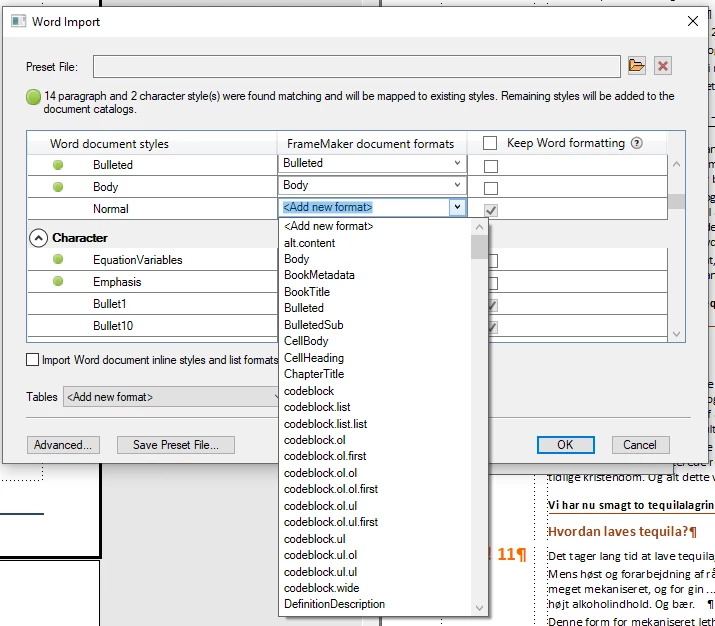
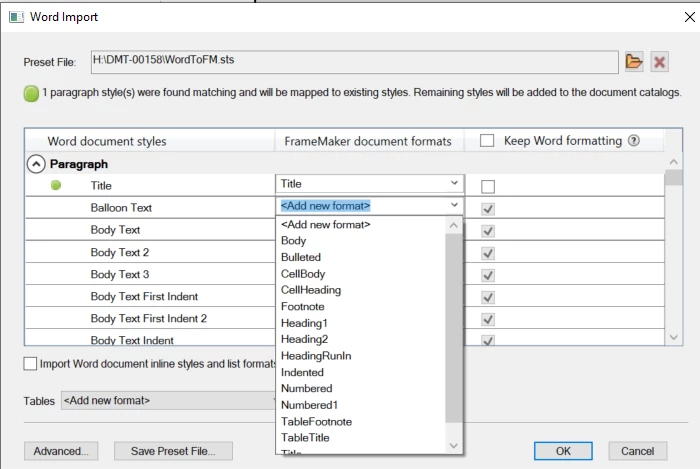
The Preset window appears to have only a limited set of FrameMaker styles to choose from when attempting to map the sytles contained in the imported Word document.

Is there a way to add more styles? If I edit my saved (.sts) file with a text editor (Notepad), the next time I select this file in the Word Import window, it has lost any previous mapping. (Note: If I do not open the file, it is OK).

Can anybody throw some light on this preset file and any way it might be edited?

Thanks Alan

Adelaide, South Australia.


This topic has been closed for replies.
Correct answer FrameMaker-dk

In the filter dialogue the filter offers a standard set of FM paragraph styles, but the last row is "add another..." which will give you access to all the remaining styles in your fm docuement.


3 replies

Participant
July 7, 2024
quote

Hi, I have a question regarding the Word Import "Preset" file. I am using FM 17.1.0.305.

The Preset window appears to have only a limited set of FrameMaker styles to choose from when attempting to map the sytles contained in the imported Word document.

Is there a way to add more styles? If I edit my saved (.sts) file with a text editor (Notepad), the next time I select this file in the Word Import window, it has lost any previous mapping. (Note: If I do not open the file, it is OK).

Can anybody throw some light on this preset file and any way it might be edited?

Thanks Alan


By @Alan29498485i8sf


Many thanks to StudioSm for pointing out this handy trick!


FrameMaker-dkCommunity ExpertCorrect answer
Community Expert
May 12, 2023

In the filter dialogue the filter offers a standard set of FM paragraph styles, but the last row is "add another..." which will give you access to all the remaining styles in your fm docuement.


Bjørn Smalbro - FrameMaker.dk
Participant
May 14, 2023

Thank you StudioSm.

While I could not locate the "add another" option, instead of using a "blank" FM document as the target for the Word import, I cleared out an existing FM document which has all the para styles I required. I could then use the import and see all of these. Thanks for the heads up on this. Regards, Alan

Community Expert
May 15, 2023

Aha - so you were using an empty fm file - that explains why it did not work 🙂 Good that you found a solution!

Bjørn Smalbro - FrameMaker.dk
Community Expert
May 12, 2023

I would expect you to have all the styles which are in the current FrameMaker document available to match with the word styles. Are there styles in your current FrameMaker document that do not appear in the mapping table?

Bjørn Smalbro - FrameMaker.dk