
Participant
November 7, 2024
Question

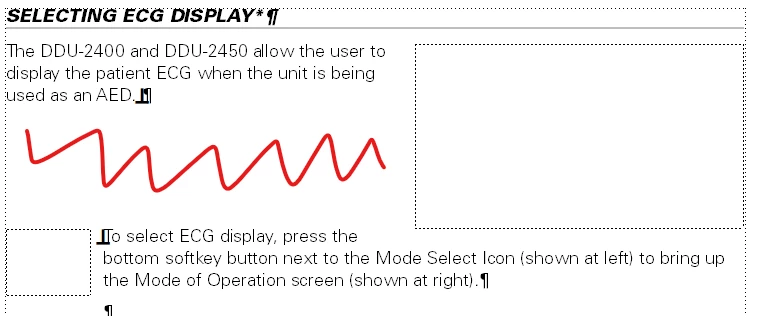
Is there a way to have two "run into paragraph" anchored frames without extra space?

  • November 7, 2024
  • 2 replies
  • 244 views

Hi Framemaker experts!

I'm trying to add two "run into paragraph" anchored frames to my text, one on the right, and one on the left.  

However, when I do so, there is a giant gap between the paragraphs. Is there any way to fix this?
 

Thank you,

Wendy


    This topic has been closed for replies.

    2 replies

    Matt-Tech Comm Tools
    Community Expert
    Community Expert
    November 11, 2024

    When I run into this issue with FrameMaker - Working with Content, I either run both anchored frames into the right of the column, or (in your example) reformat the smaller image and display at insertion point in the parentheses currently containing shown at left.

    By displaying as one paragraph, the latter would allow you to snug up into the area represented by the red squiggle.

    Another solution: Move the description of the Mode of Operation into the paragraph above.

    Perhaps the ideal solution: Place both graphics in a single anchored frame, set to Below current baseline and rewrite as needed.


    -Matt Sullivan, FrameMaker Course Creator, Author, Trainer, Consultant
    Bob_Niland
    Community Expert
    Community Expert
    November 7, 2024

    If both are anchored to the first para, it works.

    In your example, the right AF is anchored to the 2nd para, which is causing the para to start below the initial AF. Without knowing more about the layout objectives, I have no instant conjectures on other approaches.

    Participant
    November 7, 2024

    Hi Bob!

    Thanks for the reply!

    the right AF is in the first paragraph. I want the second paragraph to start with the other, smaller frame. So, I want two paragraphs, but don't want the empty space between. Does that make sense?

    Bob_Niland
    Community Expert
    Community Expert
    November 7, 2024

    I can't get opposing run-ins to nest.
    I can get the lower/left AF to nest if set to "At Insert Point", with a generous negative Distance Above Baseline, but that only works for the first line of the second para.

    I can conjecture hacks using borderless Tables, Side Heads or run-around placement on custom Master Page that might work around it, but use frequency, AF sizes and publication workflow would have a lot to say about those (some won't flow to HTML).