
Prakash1311
Participant
March 9, 2017
Question

Issue when importing Corel X8 file in FM12

  • March 9, 2017
  • 2 replies
  • 952 views

Hi All,

I am facing a peculiar issue when I import Corel X8 version files into FM12.

All the open 'curves' are getting closed with unwanted lines.
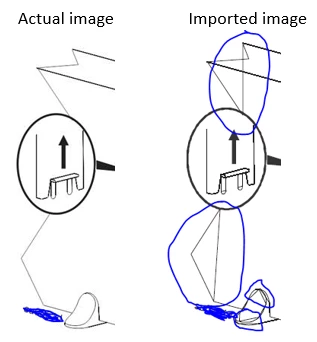
The process I follow is File > Import > Object > Create from file...

Please let me know if any of you have faced a similar issue and if is there a solution to this issue.

Thanks,

Jayaprakash

PS: I was using Corel V12 till recently and never faced such an issue.

This topic has been closed for replies.

2 replies

Arnis Gubins
Inspiring
March 9, 2017

Using any type of OLE approach has been problematic with FM. I've always used EPS files exported from Corel Draw without any issues.

Prakash1311
Participant
March 10, 2017

Hi Arnis,

Thank you for the info.

Since we have used Corel directly in the earlier version, without any problem, creating an EPS out of Corel file will only add steps in our process.

As we upload our source files to a server, we will have to maintain two sets of files for the same illustration. This will be a pain in the wrong places.

This is the reason I am looking for a fix to this problem.

Regards,

Jayaprakash

Arnis Gubins
Inspiring
March 10, 2017

Have you tried specifying version 12 when doing a Save As in Corel Draw? It might be something Corel did in later file .cdr versions that is impacting the OLE rendering in FM.

Saving the EPS from Corel really isn't an onerous task. I've worked with thousands of graphics this way over the years. The EPS export settings are sticky, so it's a set it once and forget it route. Use ctrl+E, then Enter and you're done.

Properly planned/constructed libraries and/or digital asset management (DAM) tools go along way to keeping graphics organized, findable and maintainable.

Bob_Niland
Community Expert
Community Expert
March 9, 2017

What graphics file format?

You appear to be using a vector format. You might try exporting in a different vector format, such as EPS, SVG or PDF, and see if the artifacts are still present. It would also be worth seeing if any other app that can import what you're generating has the same problem.

I used to see this happen from time to time when importing from PTC ProE (now Creo).

Prakash1311
Participant
March 10, 2017

Hi Bob,

Thank you for the tip.

Yes, I use vector images in my FM files. This problem cropped up when I upgraded my Corel software from V12 to X8.

Even though I was following the same process, I never faced any issues when I was working with V12 version of Corel.

Adding one more step in our process will make a lot of difference as we link the source files in FM. The source files are also uploaded to a server. We will have to maintain two sets of files for the same illustrations; one Corel and one EPS.

This is the reason I looking for a fix to this problem.

Regards,

Jayaprakash