Participant
February 9, 2024
Answered

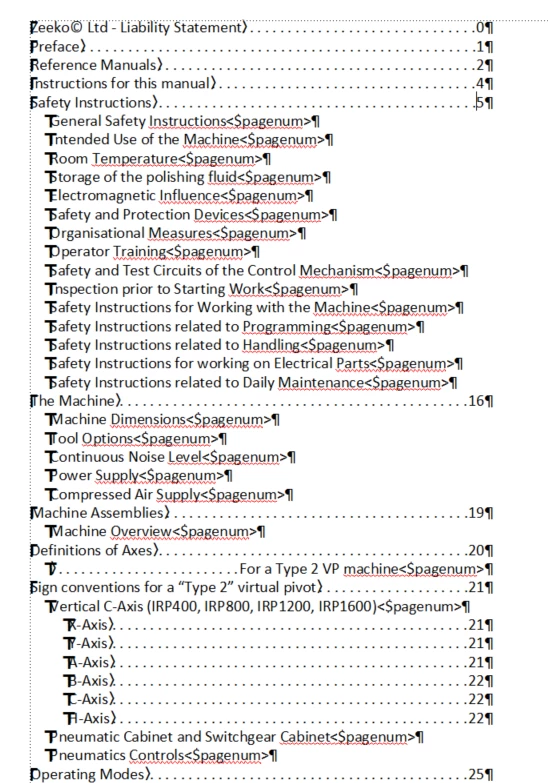
Issue with TOC, displaying <$pagenum>

Hi all,


Can anyone help with this issue? I have created a TOC and getting the following issue... my TOC is displaying <$pagenum> at the end of every line?

    This topic is closed to new replies. Start a new post to keep the conversation going.
    Matt-Tech Comm Tools
    Matt-Tech Comm ToolsCorrect answer
    Community Expert
    February 9, 2024

    On your TOC reference page, compare the code for your first level entries to the code on your second level entries (the ones containing the <$pagenum>.

    Follow the form of your first level entries, and you should be all set.

    -Matt Sullivan, FrameMaker Course Creator, Author, Trainer, Consultant

    6 replies

    Matt-Tech Comm Tools
    Community Expert
    Matt-Tech Comm ToolsCommunity ExpertCorrect answer
    Community Expert
    February 9, 2024

    On your TOC reference page, compare the code for your first level entries to the code on your second level entries (the ones containing the <$pagenum>.

    Follow the form of your first level entries, and you should be all set.

    Translate
    -Matt Sullivan, FrameMaker Course Creator, Author, Trainer, Consultant
    Participant
    February 12, 2024

    The issue is now resolved, not sure how I did it, but managed it in the end. I think I must have done what you said, becuase now it displays fine - thanks


    Translate
    frameexpert
    Community Expert
    Community Expert
    February 9, 2024

    Please send a screenshot of your TOC Reference Page (View > Reference Pages).

    Translate
    www.frameexpert.com
    Participant
    February 12, 2024

    The issue is now resolved, not sure how I did it, but managed it in the end - - thanks

    Translate
    Jeff_Coatsworth
    Community Expert
    Community Expert
    February 9, 2024

    Is this a generated TOC or one you did up by hand? And what version of FM are you running?

    Translate
    Participant
    February 12, 2024

    The issue is now resolved, not sure how I did it, but managed it in the end - - thanks


    Translate
