
Inspiring
November 7, 2019
Answered

Issues printing a FrameMaker 12 book to Adobe Pro XI PDF

  • November 7, 2019
  • 5 replies
  • 1936 views

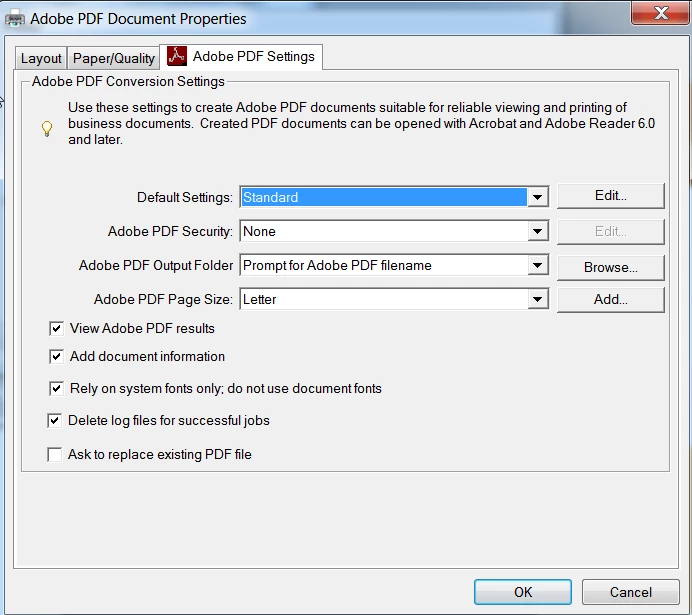
We are having issues printing a FrameMaker 12 book to PDF using a remote desktop.  We have Adobe Pro XI.  On the remote computer it won't print at all.   Under the properties tab, there are 4 boxes, with the bottom one being the paper size.  The first 3 lines on mine are populated, but for the remote computer, we are unable to edit them to match my settings.


My computer, which is not a remote, used to print a 900 page book to PDF in an hour and 20 minutes, and for the last month, it is now taking 5 - 6 hours.  I have asked if there has been a change to our systems, servers or hardware added during that time, but the person I asked said no.  He is at a different location, so he might not know for sure. 


So we now have 2 issues, the remote not being able to print at all and my computer taking 6 hours to print.  Any suggestions/help would be much appreciated.  Thank you!
This topic has been closed for replies.
Correct answer swilkinson

Hey Jon!

I meant to add that the rest of us will also have to upgrade to Windows 10 soon too, so our issues might just be beginning with everything.  So much fun!

Thanks again for your help!  I'll keep you posted! 🙂


Hey Jon and everyone!


I just wanted to update you all to let you know that we do have both printing issues resolved!  The first issue was duplicate fonts on my computer.  A free program was able to be downloaded to remove duplicate fonts.  The other issue was resolved by uninstalling Acrobat XI and reinstalling it the correct way.  Our IT person did not do a restart after he uninstalled DC and before he installed Acrobat XI.

Thank you all for taking time to make suggestions to help solve our issues.  It is much appreciated!


5 replies

Participating Frequently
November 11, 2019

I experienced a sudden huge slowdown in distiller speed when switching to Windows 10.

It turned out to be that Windows Defender was set to scan every changed file on the filesystem.

And because the temp ps file was being updated thousands of times as the postscript was generated, it was being re-scanned by Windows Defender after every change :S

Turning that feature off in Defender sped things back up to normal speed.

Inspiring
November 13, 2019

Thank you!  We tried turning off the Windows defender and it helped a little bit, but still took 5 hours.  Page counts differ with each book we publish, so it might have been a smaller book.  I should have documented the page counts, but I didn't.

Legend
November 11, 2019

A number of people have reported recent issues appearing in Acrobat XI, even though it is long dead and nothing changed. Many found happiness by making sure that 11.0.23 was installed, but it would be wise to plan for getting up to date by subscribing to Acrobat DC.

Inspiring
November 13, 2019

The computer that won't print at all is using Windows 10 and originally had Acrobat DC installed, but someone told us that DC didn't play well with FM12, so we had Acrobat DC uninstalled and Acrobat XI installed.  Unfortunately, it didn't change a thing.  Still unable to print.

JonBe
Inspiring
November 11, 2019

Hi,

What version of Windows are you running? Is it x86 or x64?

While there are many variables in the saving/printing as/to PDF, I have a few suggestions. I have not used FM12 much; my experience is with FM7-11, FM2017 and FM2019.

Remote printing - Does a tps file get created? By unable to edit the settings do you mean the options are grayed out or locked? If so, have permssions for the user used to access the remote system changed? The PDF settings are typically in %appdata%Adobe\Adobe PDF\Settings and [installpathtoacropro]\Acrobat\Settings.

Local print of a 900 page taking 5-6 hours - This seems like a resource issue to me. For example is disk space running low, or does %temp% contain lots of files. What about free memory. Is there some other process using a large amount of memory.


Jon

Inspiring
November 13, 2019

Hi Jon!

We are running 64 bit Windows.  Above is what the screen looks like for the computer that won't print at all.  They are not all grayed out or locked, but there are no options for the Default settings Edit button.  For the Adobe PDF Folder option, there is only one and it is not the correct one that we need.  Please see below.


I don't believe that a tps file gets created and permissions also haven't changed.  I will answer your questions about the slow printing in another message.  Thank you very much for your assistance!

JonBe
Inspiring
November 15, 2019

Hi,


With the slow printing problem you might want to try printing to a ps file (my ref to tps was prob a memory from FM 7 or 9! 🙄). That way you can see if the prob is with FM or Distiller. File->Print shows the dialog example I used. On my Win10 comp with Pro DC, double clicking the .ps file invokes Distiller.


I am not sure what else to suggest with the other problem of missing options in the remote computer. Is the same user that Acrobat Pro was installed with being used now? If not has a reinstall been tried? What files do you see in C:\Program Files (x86)\Adobe\Acrobat DC\Acrobat\Settings (change C:\Program Files (x86)\Adobe\Acrobat DC to whereever Pro X1 is installed. Open Distiller and click Settings->Edit Adobe PDF Settings..., then select Show All Settings. Does it look like this:


What printer is selected in FrameMaker, BTW?


HTH! 😎


Jon

Community Expert
November 8, 2019

For the issue of "not printing at all", I suggest you disable "Rely on system fonts ...". It is often causing trouble for me, and disabling helps.

Bjørn Smalbro - FrameMaker.dk
Inspiring
November 13, 2019

Thank you!  We will try your suggestion.

Jeff_Coatsworth
Community Expert
Community Expert
November 7, 2019

I suspect your IT dept has done something - you're printing to the Adobe PDF printer instance in both cases?

Inspiring
November 13, 2019

Yes, we are printing to the Adobe PDF printer in both cases.  Thank you!

Community Expert
November 13, 2019

Have you tried printing to .*ps and afterwards running the ps file through Distiller? Might give you an idea as to where things are going awry.


Bjørn Smalbro - FrameMaker.dk