
Inspiring
March 27, 2017
Answered

Issues printing correct font to PDF

  • March 27, 2017
  • 1 reply
  • 6319 views

Has anyone else had this issue, or have possible reasons why it is happening?

I am using FrameMaker 2015 on Windows 8.1.

Fonts used are HelveticaNeueLT Pro TrueType family. Fonts are new within the last 4 months.

Seemingly out of the blue, my Save As...PDF (using this option to get correct CMYK colors) will stop printing many of the Helvetica fonts properly. They come out fat and blocky, as if the correct fonts are not installed on my system (but they are).

I'm trying to see if I can track this down to Windows automatic updates, but can't figure out what on my system is changing to break the print process.

Last time it happened, a reinstall of FrameMaker fixed the issue. This time, reinstall has no effect. IT has also tried reinstalling the fonts, to no avail.

My PDF settings are set to embed all of the TrueType fonts in use into the document.

I just don't know what else to look at. Does anyone have any ideas?

Thank you!

Diane
This topic has been closed for replies.
Correct answer dianeo25300006

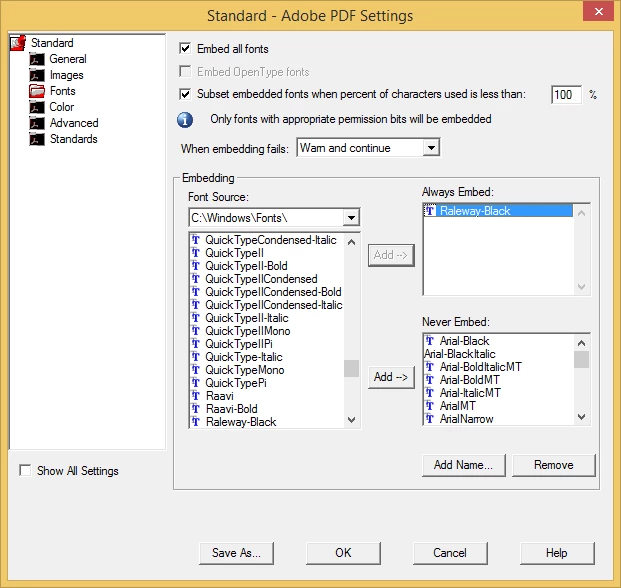
Have you tried creating a PDF Job Options that forces download of your finicky font?

Here's a screenshot of the Distiller Job Options window that would force embedding of the Raleway-Black font.

I've had various fonts that require this over the years, (but Raleway isn't one of them...I just picked it as an example)

-Matt

www.techcomm.tools


Hi Matt - yes, I do force the embedding of our fonts.

For this case, for the fix I had to save each individual .fm file as .mif, close the file, reopen, save as .fm again.

It appears that even though my content is being copied from a .txt file (using Microsoft NotePad) some kind of junk is getting copied into the FM file(s), and then of course if I update a paragraph/table style and import to other files, it's like a disease.

So I haven't learned the exact cause, but I have a workaround. Here's hoping I don't have this issue for a very, very, very, very long time.

1 reply

Bob_Niland
Community Expert
Community Expert
March 27, 2017

Same result when saving-as in RGB (vs. CMYK)?

In addition to FM, what versions of Acrobat (including Std, Pro) are installed?

Inspiring
March 27, 2017

Adobe Acrobat Pro DC version 2015.023.20070

Adobe Acrobat Distiller version 15.23.2005......

Adobe Reader XI version 11.0.19

No the issue does not exist when printed with RGB colors!!!! WHAT ON EARTH????

Legend
March 27, 2017

Please also check, if you are on the latest FM 2015 Update (Update 5). There were several CMYK related issues fixed of the time.

Go to Help > Updates in FM 2015 main menu.