Inspiring
April 17, 2018
Answered

Issues with Appendix Title in TOC

  • April 17, 2018
  • 2 replies
  • 1690 views

I have a book file that has one appendix file ("Appendix A: Event Codes"). In the appendix, the word "Appendix" is tagged Chapter.num new, the letter "A" is tagged Chap.Num, and "Event Codes" is tagged Appendix name. My TOC file is set up to include paragraphs tagged Appendix.name, Chapter.name, Head1, Head2, and Index Title.    

In the generated TOC, the appendix appears as "Appendix Event Codes: Event Codes" instead of "Appendix A: Event Codes." I tried adding the Chap.Num tag to the list of paragraphs included in the TOC, but that didn't work. Does anyone know what mistake I'm making?

Thank you,

Cameo

This topic has been closed for replies.
Correct answer Barb Binder

Hi Cameo:

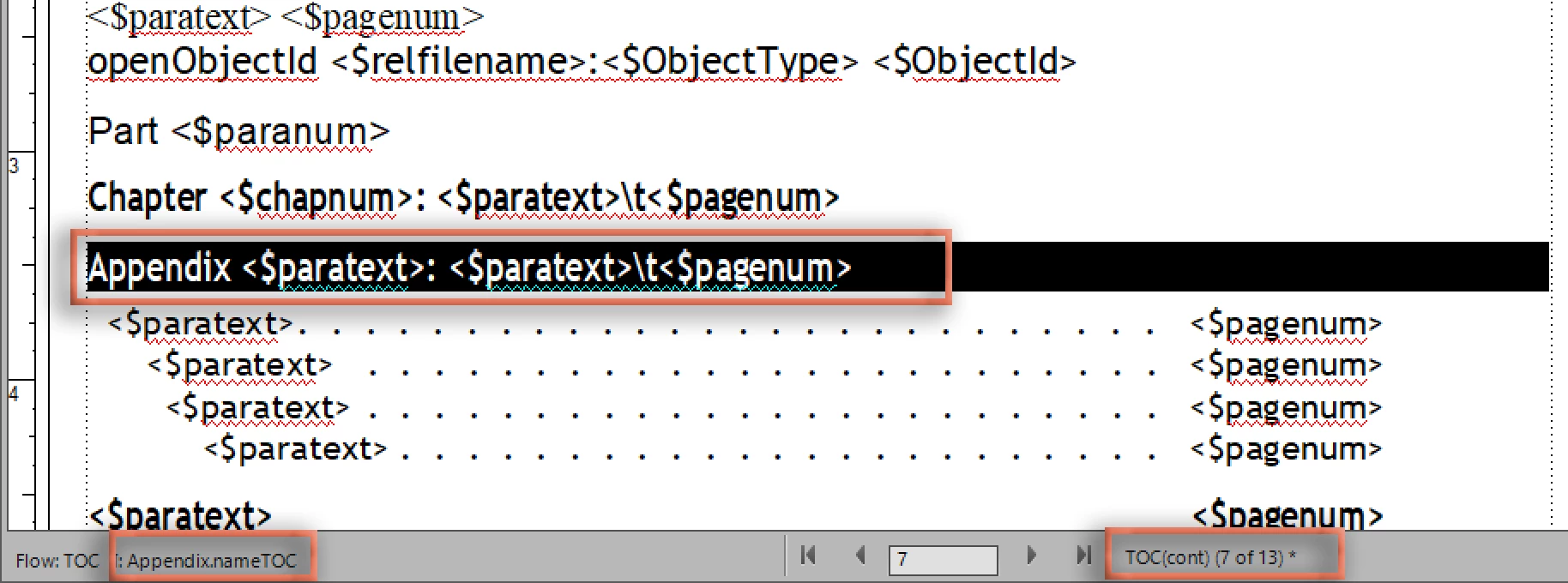
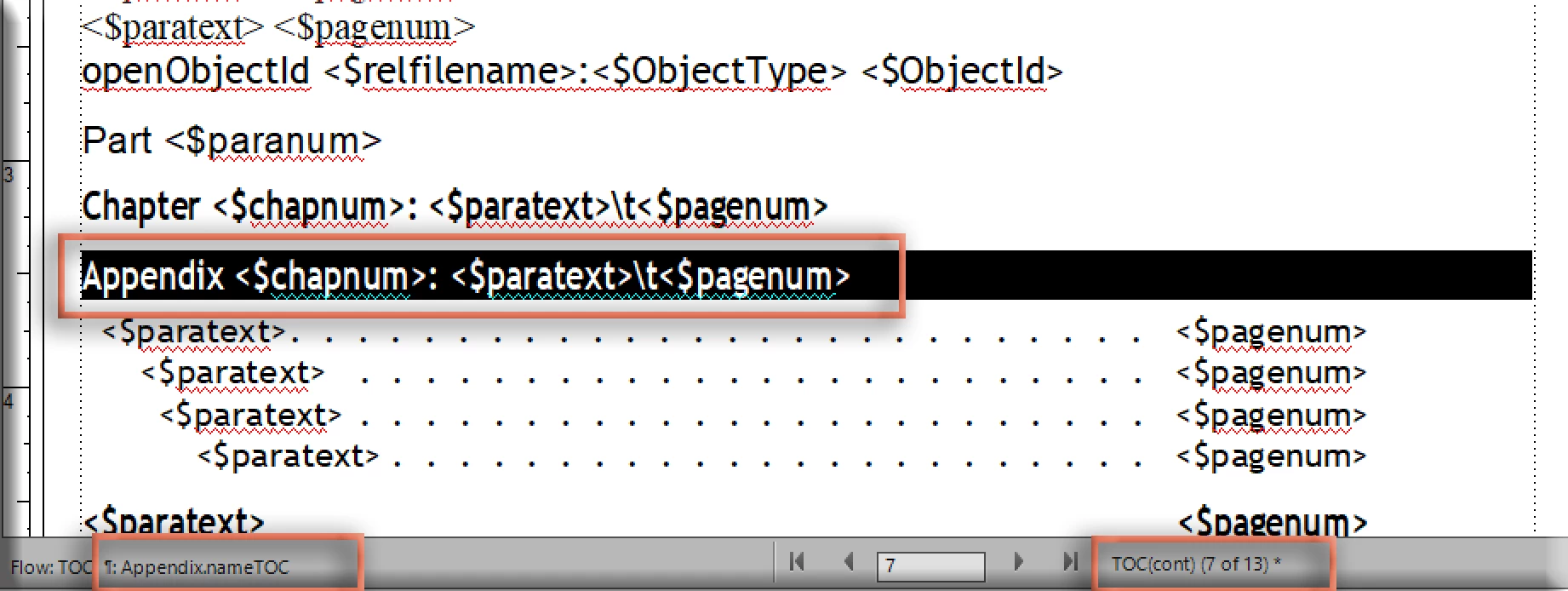
View > Reference Pages > TOC(cont) 7 of 13

Update the building blocks from:

to:

~Barb

2 replies

Barb Binder
Community Expert
Barb BinderCommunity ExpertCorrect answer
Community Expert
April 27, 2018

Hi Cameo:

View > Reference Pages > TOC(cont) 7 of 13

Update the building blocks from:

to:

~Barb

~Barb at Rocky Mountain Training
Inspiring
April 27, 2018

Thank you so much, Barb!

That did the trick.


Best,

Cameo

Barb Binder
Community Expert
Community Expert
April 27, 2018

So this question is answered? Just in time! 

~Barb

~Barb at Rocky Mountain Training
Barb Binder
Community Expert
Community Expert
April 17, 2018

Hi Cameo:

How have you indicated to FrameMaker that Appendix A has the chapter number set to A?

The correct way:

  1. Open Appendix A. Delete the letter A and insert the <$chapnum> variable. Save the file.
  2. Right click Appendix A in the book window > Numbering > Chapter:
    Chapter # 1, Format: ALPHABETIC, Set
  3. Update the TOC.

If that takes care of A, on the B. Insert the <$chapnum> variable. Then set the numbering to Format > ALPHABETIC and Continue Numbering from Previous Chapter in book.

~Barb

~Barb at Rocky Mountain Training
Inspiring
April 18, 2018

Hi Barb,

I followed the steps above, and my TOC now has a new entry: Appendix A: A. It also still shows "Appendix Event Codes: Event Codes" right under the new entry.

-Cameo

Barb Binder
Community Expert
Community Expert
April 18, 2018

Ok, Cameo. I'm trying to recreate this from your description, so let me try it again.

  1. My interpretation of your description is that In the Appendices there are three paragraph tags (formatting doesn't matter) to identify the appendix. The A on Chap.Num is added via the <$chapnum> variable.
  2. In Set up Table of Contents, Fm is pulling in Appendix.name and not the other two, as per "My TOC file is set up to include paragraphs tagged Appendix.name, Chapter.name, Head1, Head2, and Index Title".
  3. On the TOC reference page, the paragraph tagged Appendix.NameTOC looks like this.
  4. When you update the TOC, the result is:

~Barb

~Barb at Rocky Mountain Training