Lion_techpub
Known Participant
October 30, 2020
Question

Korean font : Punctuation mark spacing issue

  • October 30, 2020
  • 2 replies
  • 519 views

Image no.1

Image no.2

Image no.3


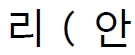
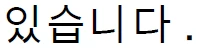
As you can see three screen capture images above, there are unncessary spacing both bofore and after the punctuation mark regarding Korean font.


I'd like to make letter spacing both before and after the punctuation mark natural just like western font (e.g. English).


Can you help me?

This topic has been closed for replies.

2 replies

Be.eM
Inspiring
October 30, 2020

These spaces are typically a part of the character in Asian fonts. The paragraph designer has an extra tab for Asian typesetting. Is the Asian Composer enabled? There is an extra setting for punctuation spacing (compression: auto or always on). Check these settings.

Bernd

Jeff_Coatsworth
Community Expert
Community Expert
October 30, 2020

If you didn't enter the text with spaces before and after the punctuation, then I suspect there's an issue with the choice of font you're using.

[Edit - hit the Enter too soon] - As an experiment, try another Korean font to see if there's any effect on the spacing.