


Inspiring
January 27, 2016
Question

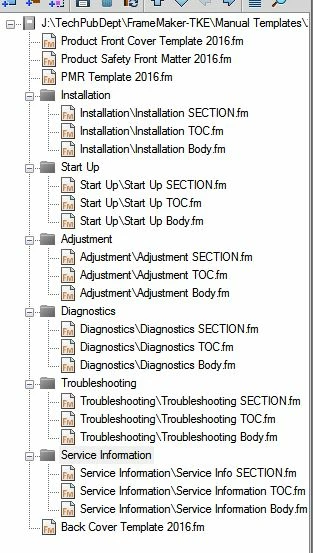
Large Document with Folders using TOC within each Folder

  • January 27, 2016
  • 1 reply
  • 622 views

Hello All,

I hope someone can help me. We have changed our Product Manual Templates to having a TOC in each section. The problem is that I haven't been able to get the TOC to have links when making a PDF. Also, the only way I have found to make a TOC for each section is using the Special TOC while the Body section is open (which I can't update, and isn't working). When I try to add a TOC to a folder within the book, it looks at the whole book. Is there a way to do this?

Thanks!!

I am using FM12....
    This topic has been closed for replies.

    1 reply

    Participating Frequently
    January 28, 2016

    FrameMaker 2015 adds support for mini TOCs, which probably do what you want. See Getting started with mini TOC.

    No experience myself; we're still on FM12 ourselves.

    lsk2002Author
    Inspiring
    January 28, 2016

    Thank you for replying. We don't want to go to 2015...uggg. I have tried several different things and have been looking in the help files. I have yet to see anything that has more than one TOC. You can make a TOC, it is just that the bookmarks don't work and the Table of Contents have no links.

    Maybe I can find another way that the department will agree to.

    Thanks,

    ls

    Jeff_Coatsworth
    Community Expert
    Community Expert
    January 28, 2016

    What about using the “book of books” concept instead of folders?