Hi,
I did not use this feature yet. When I check the documentation, it says:
Last Line Right must be smaller than the Right value.
Both values are counted from the right. This means that your -2 cm is not valid and is reset to 0. Correct.
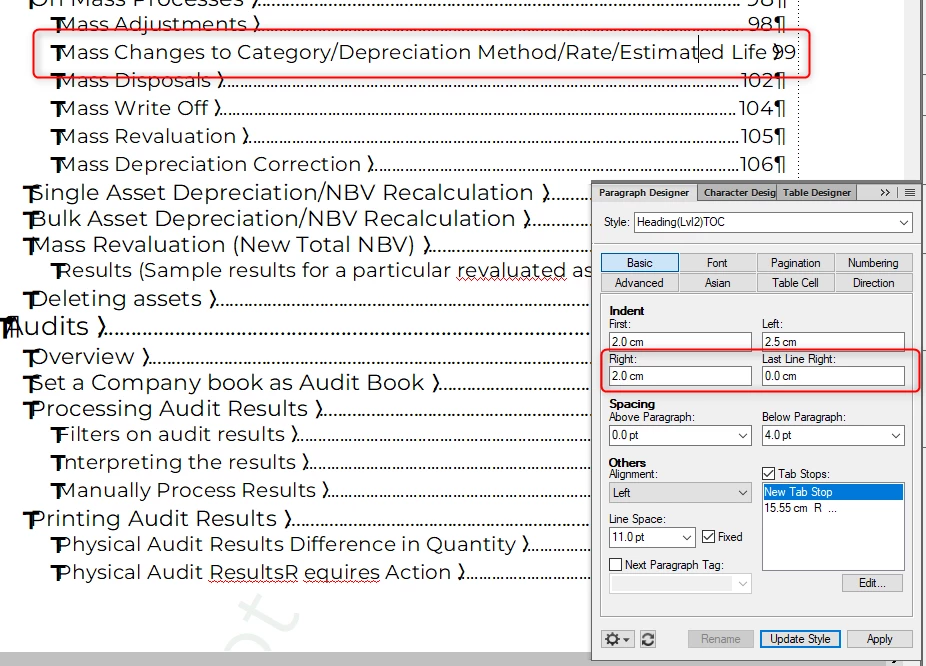
When I see your screenshot, it says:
All page numbers have a tab stop at 15.55 cm right.
All paragraphs should have a right indent of 2 cm. I do not know the width of your text frame. I assume 16 cm. This means that the paragraphs would be indented more to the left than the position of the tab stop. That's OK, as the Last Line Right can define something different.
If you want that the last line ends at 0.45 cm (16 - 15.55) before the page margin, then you can enter this value as Last Line Right.
If you enter 0, then the last line will end at the width of the text frame.
As you have a tab stop at 15.55 cm, the last line cannot (or should not) end at the width of the text frame.
When I tested this, I got your behaviour:
Right 2 cm and Last Line Right 0 -> page number is further right than the tab stop.
It worked, when I entered Last Line Right 0.45 cm. Also the line wrapping worked.
Everything clear now 😉 ? Just change the Last Line Right to (page width minus tab stop).
Best regards, Winfried




 AdChoices