TechPubsFrameMaker
Inspiring
February 20, 2018
Answered

Leader dots in LOT unexpectedly change shape

  • February 20, 2018
  • 1 reply
  • 1067 views

Hi, I am using the TableTitleLOT paragraph tag to correctly align page numbers with leader dots for any tables titles that are longer than one line. 

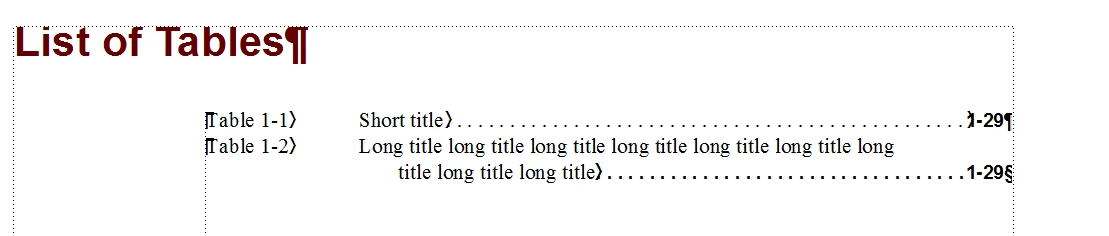
After finding helpful advice on the forum, I set the maximum word spacing to 325% and the minimum word spacing to 275% and the optimum spacing to 100%, and I added two tabs between <$paratext> and <$chapnum> to right align the page numbers on the second line.  I set the TableTitleLOT tag with right-aligned, square leader dots; however, the leader dots change from square to round when I add the second tab in the paragraph tag (in either reference or body pages).  I could live with round leader dots, except now the short title and the long title have different leader dots (see attached screenshot).  I really want the same style of dots for all table titles, long and short, so the LOT has a consistent look.

Does anyone know why the dots change when an extra tab is added?  Thanks, Emma.
    This topic has been closed for replies.
    Correct answer Matt-Tech Comm Tools

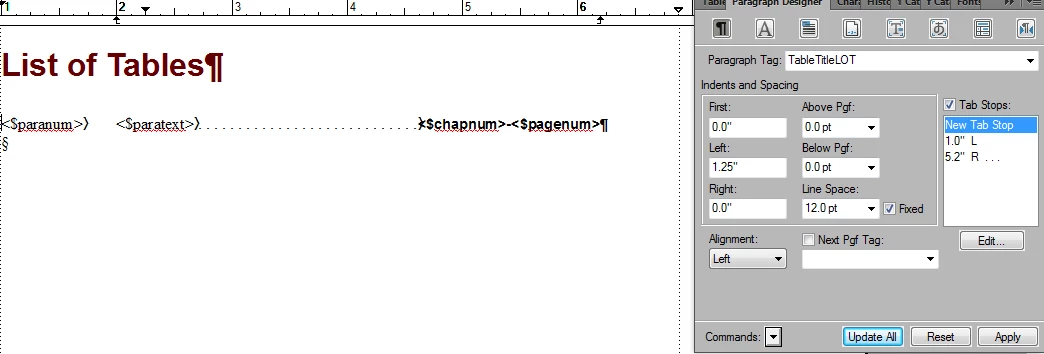
    You must be right - I created a new book and set the same settings, and the leader dots stayed the same.  The doc I'm working on is a legacy doc from several years ago, and previous Frame versions.  Here's the ss of the reference page.


    Yes, select the > before the <$chapnum>.

    Using the Character Catalog, remove the character tag by selecting Default (Para) Font, where (Para) is the pilcrow, or paragraph symbol.

    You should see the difference in the tab symbol, and after regenerating your LOT you should be fine.

    -Matt

    1 reply

    Matt-Tech Comm Tools
    Community Expert
    Community Expert
    February 20, 2018

    Hi Emma,

    It looks like your tab stops are probably using a different leader style. Can you check each tab stop and see if they're set to the same radio button choice?

    -Matt Sullivan, FrameMaker Course Creator, Author, Trainer, Consultant
    TechPubsFrameMaker
    Inspiring
    February 20, 2018

    Hi Matt, here's a ss of the leader settings for the paragraph tag.  I just have the right-aligned tab set with a leader.  I forgot to say I'm using FrameMaker 2015.

    Thanks, Emma

    Matt-Tech Comm Tools
    Community Expert
    Community Expert
    February 20, 2018

    can you share a pic of the reference page?

    You may have inadvertently applied a character tag to the second tab character.

    -Matt Sullivan, FrameMaker Course Creator, Author, Trainer, Consultant