DJTOregon
Known Participant
Apr 17, 2019 8:19 PM UTC
Answered

Leader Lines Justified

Does anyone know if there is a way that leader lines can be automatically justified in an auto-generated TOC, LOF, LOT, etc?  I'd like for them to simply line up against the right margin but they will not. Please see below.


    This topic is closed to new replies. Start a new post to keep the conversation going.
    LinSims
    LinSimsCorrect answer
    Community Expert
    Apr 22, 2019 8:40 PM UTC

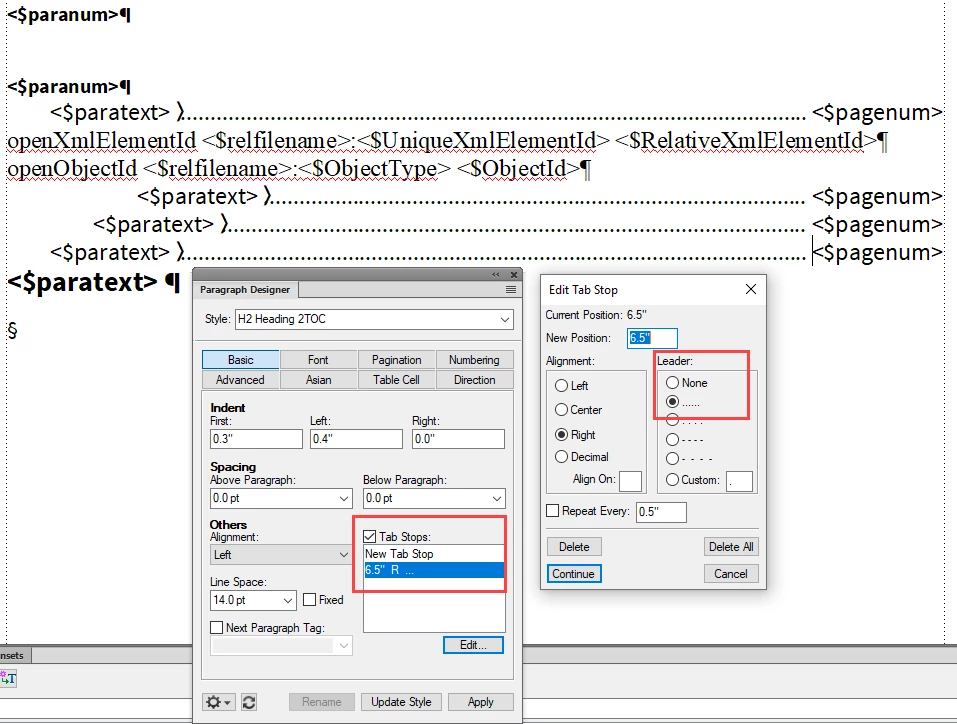
    You need to open the paragraph designer for each of these tags and set a right-align tab with a dot leader. If you insert the dot leaders manually, you are going to run into issues with lines wrapping to the next line.

    6 replies

    LinSims
    Community Expert
    Community Expert
    Apr 22, 2019 8:42 PM UTC

    Or, if what you did was set a Left-aligned tab, you can change it to a Right-aligned one and click continue.

    Translate
    DJTOregon
    DJTOregonAuthor
    Known Participant
    Apr 22, 2019 9:30 PM UTC

    That worked! Thank you so much! It looks a lot better now.

    Translate
    LinSims
    Community Expert
    LinSimsCommunity ExpertCorrect answer
    Community Expert
    Apr 22, 2019 8:40 PM UTC

    You need to open the paragraph designer for each of these tags and set a right-align tab with a dot leader. If you insert the dot leaders manually, you are going to run into issues with lines wrapping to the next line.

    Translate
    Barb Binder
    Community Expert
    Community Expert
    Apr 19, 2019 3:10 PM UTC

    Hi DJTOregon:

    I'm following up to see if this worked for you, or if you have any additional questions.

    ~Barb

    Translate
    ~Barb at Rocky Mountain Training
    DJTOregon
    DJTOregonAuthor
    Known Participant
    Apr 22, 2019 8:31 PM UTC

    Sorry. I was out of town with no access to Internet. It still doesn't work. Here is what I have. I need everything to be justified against the right margin. Right now it looks like this. I have also attached my reference page that corresponds to this.

    Translate
    Barb Binder
    Community Expert
    Community Expert
    Apr 17, 2019 10:52 PM UTC

    Yes, DJTOregon. You will need to edit the TOC, LOF, LOT, etc reference pages and replace the default space with a tab for those paragraphs. Then set a right-align tab at the right margin.

    Adobe FrameMaker: Adding Tabs to a Table of Contents – Rocky Mountain Training

    ~Barb

    Translate
    ~Barb at Rocky Mountain Training