
Inspiring
July 25, 2024
Answered

Line Break (br) inserted after table in Responsive HTML5

  • July 25, 2024
  • 6 replies
  • 2104 views

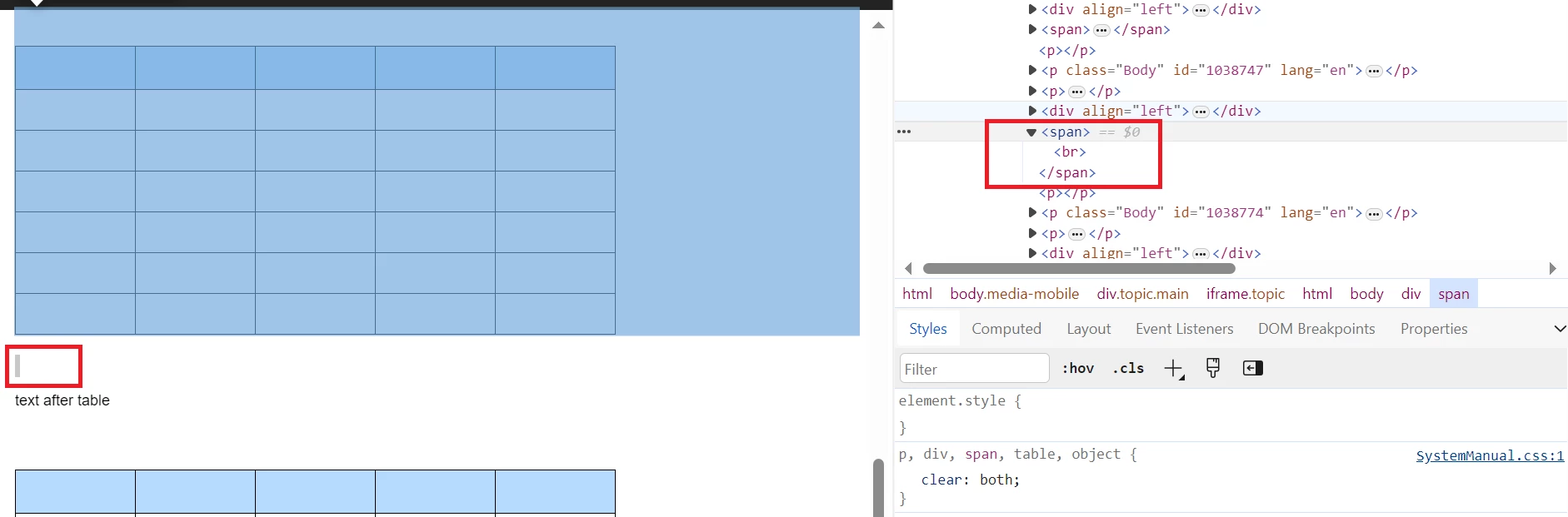
I'm finding that when I publish to Responsive HTML5, FM is inserting a line break (br) after each table. This is causing a large gap below every table that I don't want. There is no return or paragraph between the base of the table and the "text after table" paragraph in the FM file. Is this just something that FM does that you can't prevent? 
    This topic has been closed for replies.
    Correct answer ArmadilloC

    Upgrading to the latest version of FM has fixed this issue. The space after the tables is no longer there.

    6 replies

    ArmadilloCAuthorCorrect answer
    Inspiring
    September 6, 2024

    Upgrading to the latest version of FM has fixed this issue. The space after the tables is no longer there.

    Jeff_Coatsworth
    Community Expert
    Community Expert
    September 6, 2024

    Did they load you up with FM2022 patch 4?

    Jeff_Coatsworth
    Community Expert
    Community Expert
    July 29, 2024

    Was this working before and now doesn't; or was this the first time you've tried it? I wonder if testing out a copy of FM2022 might fix it - as Winfried is (I think) using FM2022 in his tests.

    Community Expert
    July 29, 2024

    Yes. I use FrameMaker 2022, 17.0.3.

    Jeff_Coatsworth
    Community Expert
    Community Expert
    July 26, 2024

    Can we see a screenshot of the source FM doc (with text symbols turned on) of that example screenshot in the original post?

    Inspiring
    July 28, 2024

    Community Expert
    July 25, 2024

    How do you insert the table in FrameMaker? In a dedicated "anchor" paragraph or in the text above the table?

    Bjørn Smalbro - FrameMaker.dk
    Inspiring
    July 25, 2024

    Both methods produce the same result.

    Jeff_Coatsworth
    Community Expert
    Community Expert
    July 25, 2024

    You don't mention the version (FM2022? FM2020?) and point version of your FM - please include that because it could be having an impact on how the HTML5 is being produced.

    Inspiring
    July 25, 2024

    Hi Jeff, I'm using 16.0.2.916.

    Jeff_Coatsworth
    Community Expert
    Community Expert
    July 26, 2024

    So FM2020 - I forget what the last patch version of that one was, but have you checked for updates?

    Community Expert
    July 25, 2024

    Hi,

    I just created a test file with a table and a paragraph with text after the table.

    However, I do not get such a large gap.

    I get the empty paragraph which you have as well (<p></p>), but not the <br> which you have marked.

    Can you describe, how you create the HTML file? What is the mapping?

    Is the table inserted into an empty paragraph?

    Best regards, Winfried

    Inspiring
    July 25, 2024

    I have tables that were imported from a Word doc and reformatted, and tables I've inserted in an anchor paragraph and tables that are inserted in the text above the table. Nothing makes any difference to the result though.

    Community Expert
    July 26, 2024

    Hi,

    When I tested this, I do not get such a <br> tag, no matter, how I insert the table ;).

    Can you describe, how you create the HTML file? What is the mapping? Do you map the table or the paragraph with the table anchor to something? Or do you just use the automap feature? Or do you select "[Use Source Style]" for the Output Style? (The last one is what I used in my test.)

    What do you get, when you create a new document with the FrameMaker default template with a table and text and convert this to HTML5?

    Best regards, Winfried