
Answered
LocY of text differs from FDK documentation
Hi,
I have a function that gets the x-y co-ordinates of the first text character in a paragraph:
function topLeftPoint(targetDoc, targetPgf) {
	// get loc of first text character in the pgf
	var firstCharOffset = (targetPgf.GetText(Constants.FTI_String))[0].offset;
	var txtLoc = new TextLoc(targetPgf, firstCharOffset);

	// get top-left Point relative to the parent SubCol
	return new Point(
		targetDoc.GetTextVal(txtLoc, Constants.FP_LocX).ival,
		targetDoc.GetTextVal(txtLoc, Constants.FP_LocY).ival
	);
}
The FDK docs say that LocY gives the "Offset of the top of a character from the
top of the subcolumn", but it actually seems to get the y pos of the baseline.
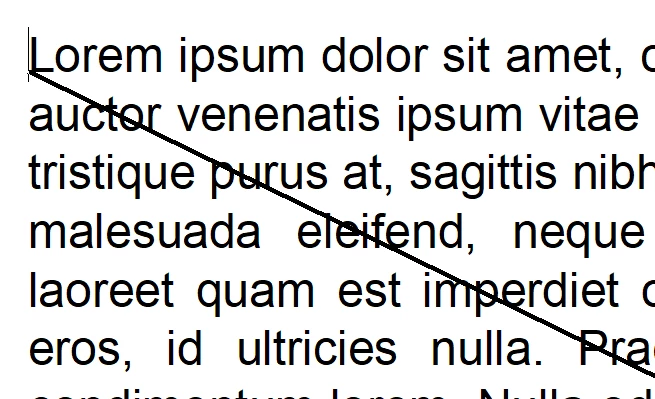
Am I doing something wrong, or is the documentation just inacurate?
And does anyone know how to get the y pos of the top?
The best I've managed is to subtract the FP_LineAscent, but that's not quite the top 😞


 AdChoices