


Arnis Gubins
Inspiring
November 12, 2013
Question

Long autonumber text not wrapping in narrow columns

  • November 12, 2013
  • 2 replies
  • 2463 views

Has anybody had to deal with longish autonumber texts in a narrow text frame [can't use a sidehead due to other issues]? I'm finding that the autonumber string [Facilitator/Self-Study Participant Note: ] doesn't wrap to the next line as shown in this screen capture:
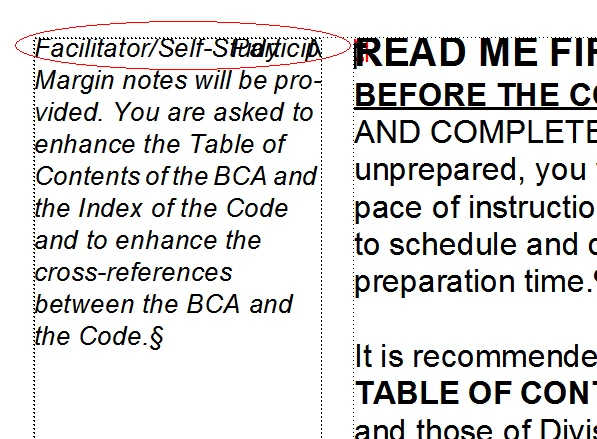
I've verified this happens in FM versions 6 through to 11. Unfortunately, I'm away from my resources for the week but don't ever recall coming up against this before.

Any comments, help highly appreciated.

    This topic has been closed for replies.

    2 replies

    Bob_Niland
    Community Expert
    Community Expert
    November 18, 2013

    Xrefs wrap. If the text containing the autonum can reside elsewhere (such as on a Reference Page), an Xref to it in the narrow Body page column does wrap.

    If there's room, you could even put the source AN text on the body page, in very small invisible color, right below the Xref.

    Arnis Gubins
    Inspiring
    November 19, 2013

    Thanks Error,

    However, that approach doesn't help out that much for the perhaps thousand(s?) or so entries in the series (mainly all manual tagging, so keystroke count/mouse-click minimization is paramount). Also, when creating a PDF, it will also create a bogus hyperlink that won't be acceptable to the powers that be [i.e. not my call on most of this]. A scripting solution seems to be th best way handle this.

    Participating Frequently
    November 12, 2013

    Hi, Arnis:

    Does this happen with other autonumber texts about the same length? If this one fails when others do wrap, I wonder if the long string of characters I'm also away from FrameMaker, so I can't test this, but I wonder if perhaps the long string of characters before the first character space exceeds some limit that prevents FrameMaker from choosing a wrap point. Perhaps someone on the forum can test this.

    HTH

    Regards,

    Peter

    _______________________

    Peter Gold

    KnowHow ProServices

    Arnis Gubins
    Inspiring
    November 12, 2013

    Hi Peter,

    I tried all sorts of different lengths, dropped the backslash, but no difference (it actaully gets worse when the backslash is dropped):

    It looks like a bug to me at this point. I'm surprised that it hasn't come up before.

    Matt-Tech Comm Tools
    Community Expert
    Community Expert
    November 12, 2013

    How about inserting a conditional hyphen?

    -Matt Sullivan, FrameMaker Course Creator, Author, Trainer, Consultant