Inspiring
October 16, 2019
Answered

Lost Document/Book Pod

  • October 16, 2019
  • 10 replies
  • 1201 views

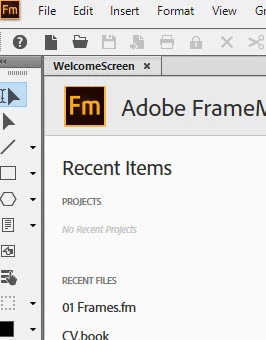
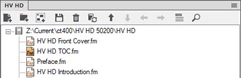
Lost the column with the book and associated files listed (33.png was what it looked like before; 22.png is what I get today). So, when I open a book, I don't see the list of sub-files/chapters. How do I get this back?

Framemaker 2019


This topic has been closed for replies.
Correct answer katydid6080
I reached out to Adobe Support. I had a corrupt file. They fixed it with a shared screen and I'm all good to go now. Thanks for your input!

10 replies

Participating Frequently
October 17, 2019

Try View > Switch to tree view [Esc r m]

(if it is available)

katydid6080AuthorCorrect answer
Inspiring
October 17, 2019
I reached out to Adobe Support. I had a corrupt file. They fixed it with a shared screen and I'm all good to go now. Thanks for your input!
LinSims
Community Expert
Community Expert
October 17, 2019

Please ignore my response on Composite Book. I read "Composite" and was actually looking at the Consolidate option. 


(I'm not dyslexic, but I have a history of reading or hearing things incorrectly at first, often with some funny interpreations. Once I was following a car on an interstate and thought that its license plate read "Expiration Date", which struck me as odd. When I got a closer look, though, I discovered it actually read "Constitution State".)

Community Expert
October 17, 2019

Hi,


OK. I see. When you choose in your file manager to hide the file name extensions, then FrameMaker does not show the book extension.

Still I do not know, why your book is not listed in Composite Documents.

Are all your books not shown in your FrameMaker window?

I do not have a solution for you. Sorry. Maybe someone else has an idea.

You can write to the Adobe FrameMaker support and see, if they find something. Please refer them also to this thread. When you get a solution, please post it here.

tcssup@adobe.com


Best regards


Winfried

LinSims
Community Expert
Community Expert
October 17, 2019

I think that Windows > Composite only works with document files.

Community Expert
October 17, 2019

Hi,


Is your book structured?

Or why does your book file in your screenshot does not have the book extension?

Can you change the file name in your file manager and add the book extension?

Does this change anything?


Best regards


Winfried

Inspiring
October 17, 2019
Unstructured. My books do have the .book extension, it just never shows when the book pod was open. I cannot change the file name in the file manager.
Community Expert
October 17, 2019

Hi,


And what happens, when you click on your book file in the Open Files pod?

In your screenshot 33.png your book does not have the book extension. Is there any reason?

What's your exact FrameMaker version? The current version 15.0.4.751.


Best regards


Winfried

Inspiring
October 17, 2019
Current version is 15.0.4.751. When I click on the book file in the Open Files pod, nothing happens. I can click the check box, but nothing happens. I just received an Internal Error 15044 and FM shut down.
Community Expert
October 17, 2019

Hi,


What is in your Window menu in Composite Documents?

There are the open books listed.

What happens, when you click on your book?


Best regards


Winfried

Inspiring
October 17, 2019
In the "Open Files" pod, I see my current book is open. When I perform Window/Composite Documents - Composite Documents is grayed out.
Community Expert
October 17, 2019

Hi Lin,


Thanks for the tip to shrink the FrameMaker window to get to the undocked book window. I did not know this.

However, I find it extremely difficult to dock the book window. Maybe I did not find the correct position, but I can do this only, when there is already another book open.

When I open a book, it is always docked. I did not find an option that new books are not docked.


Best regards


Winfried

LinSims
Community Expert
Community Expert
October 16, 2019

Ah, I think I am missing something. You have already opened the book, right? 


At a guess, the pod showing your book got undocked from the main window. Try shrinking (but not minimizing) the main window for Frame and see if the one for the book is lurking in the background. If it is, you can drag the book window into the main window and move it to the left side of the main window until you see a blue bar. Once you do, the pod is docked again.

Inspiring
October 17, 2019
Yes. Normally, when I open a book the book pod is docked to the left. Now when I open a book, the pod doesn't appear. I already tried to see if it was lurking in the background, and it is not. I've used Framemaker for 9 years and never had this happen before.
LinSims
Community Expert
Community Expert
October 16, 2019

Maybe I'm missing something, but these don't appear to be screenshots of the same thing. 33.png is a screenshot of an opened book file, while 22.png is a screenshot of the Welcome screen without an opened book file.


What happens when you open the book file again?