

K.Daube
Community Expert
Community Expert
December 5, 2022
Answered

Main menus no more visible

  • December 5, 2022
  • 1 reply
  • 183 views

I had this problem already during developing my Enhanced Tool Bars - but have no clue anymore how I solved it:

  • Either I get a message that a menu has not been defined while reading menu customation file), or
  • I do not see the main menus of FM as soon as I open a document - and workspace is ETB.
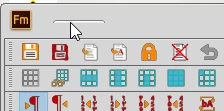
  • Clicking on that small thingy opens the menu.
  • De-installing ETB of course restores the original FM function.
  • Switching Wokspace to other than ETB does not show the main menus - so where is the culprit?
    This topic has been closed for replies.
    Correct answer K.Daube

    New experiment:

    • I have a document open and switch to WS Blank, then close FM (last used WS now is Blank, not ETB as usual).
    • Opening FM and that document → the main menu exists, but of couurse I have no tool bars.
    • I switch to workspace ETB with it's defined tool bars → the main menu is still present.
    • I save the workspace ETB and close FM
    • At next open of FM, opening another document → main menu and ETB OK.

    Conclusion:

    ETB workspace as installed is damaged - needs to be replaced.

    A new installation of ETB now works.

    1 reply

    K.Daube
    Community Expert
    K.DaubeCommunity ExpertAuthorCorrect answer
    Community Expert
    December 5, 2022

    New experiment:

    • I have a document open and switch to WS Blank, then close FM (last used WS now is Blank, not ETB as usual).
    • Opening FM and that document → the main menu exists, but of couurse I have no tool bars.
    • I switch to workspace ETB with it's defined tool bars → the main menu is still present.
    • I save the workspace ETB and close FM
    • At next open of FM, opening another document → main menu and ETB OK.

    Conclusion:

    ETB workspace as installed is damaged - needs to be replaced.

    A new installation of ETB now works.