
Make FDK client works in FrameMaker 2017
Hi,
I am new to Adobe FrameMaker FDK. I read the FDK developing guide. I tried to build a sample client using one of the sample codes given in the guide (adding elements to menu). I downloaded FM2017_FDK pack from Adobe website. I couldn't build my sample code in Visual Studio 2017 (I got lots of errors that I could't solve them). I downloaded Visual Studio 2013. I was able to build my code (eventhoght there were still some errors I had no idea how to solve them). I copied the .dll I built and copied it to the direction written in the guid (fminit/Plugins/). Add it to maker.ini as it was written in the guide. When I run FrameMaker I got an error message. 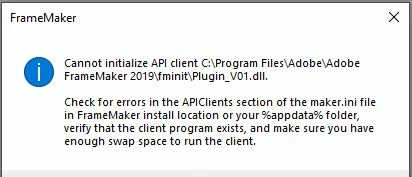
I don't know what should I do to run this sample client. I also copy my code here.
#include "fapi.h"

#define LOAD 1
#define QUERY 2

void main()
{
	IntT initializer = 1;
	F_ApiInitialize(initializer);
}
VoidT F_ApiInitialize(IntT initialization)
{
	F_ObjHandleT specialMenuId, databaseMenuId;
	/* Get the ID of the special menu. */
	specialMenuId = F_ApiGetNamedObject(FV_SessionId, FO_Menu, (ConStringT)"ViewMenu");
	/* Define the menu and add it to the Edit menu. */
	databaseMenuId = F_ApiDefineAndAddMenu(specialMenuId, (ConStringT)"DatabaseMenu", (ConStringT)"Database");
	/* Define the commands and add them to the Special menu. */
	F_ApiDefineAndAddCommand(LOAD, databaseMenuId, (ConStringT)"LoadDatabase", (ConStringT)"Load Database", (ConStringT)"\\!LD");
	F_ApiDefineAndAddCommand(QUERY, databaseMenuId, (ConStringT)"QueryDatabase", (ConStringT)"Query Database", (ConStringT)"\\!QD");
}
VoidT F_ApiCommand(IntT command)
{
	switch (command)
	{
		case LOAD: /* Code to load database goes here. */
			F_ApiAlert((ConStringT)"Load Command Executed!!\n", FF_ALERT_CONTINUE_NOTE);
			break;
		case QUERY: /* Code to query database goes here. */
			F_ApiAlert((ConStringT)"Query Command Executed!!\n", FF_ALERT_CONTINUE_NOTE);
			break;
	}
}
Any help would be appreciated.
Thanks


 AdChoices