
Manage Attribute Expression selects too much
I am working in a structured file using FM19, version 15.0.6.956.
I am trying to add the ability to hide an element (shortdesc) for pdf output but everything in the dita file is being grabbed as well. Have I missed something in process here?
- In the Conditional Tags pod, I added a conditional tag for shortdesc.
- I then went to the "Manage Attribute Experssions" and created a new expression: shortdesc
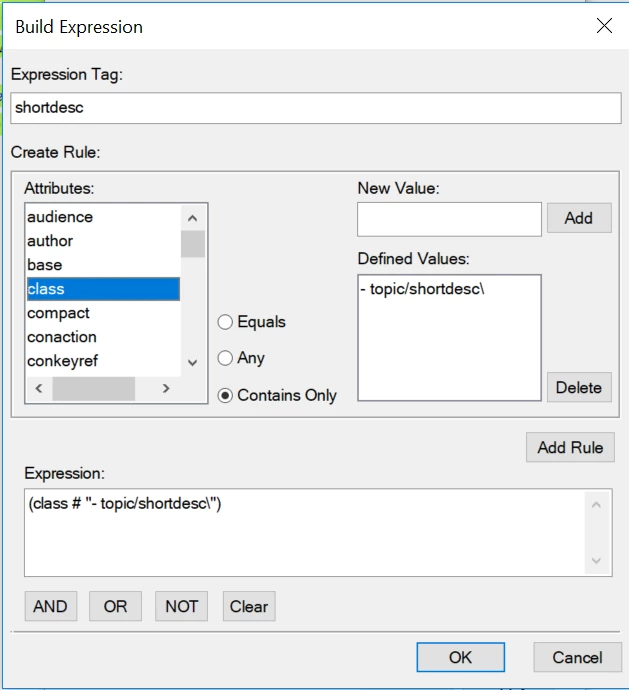
- I applied the shortdescr conditional tag
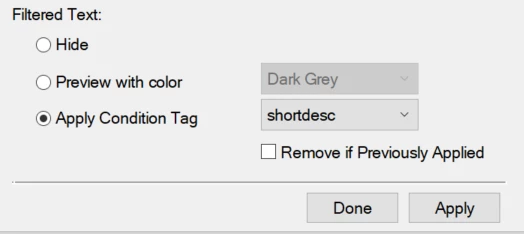
However, when I hit apply, the condition is applied to everything in the file including a draft comment. The Conditional Tags pod indicates that the shortdesc element is tagged with the shortdesc tag but oddly, the draft-comment element is also tagged with both DITA-Comment AND shortdesc tag. None of the other text in the file appears to have any Conditional Tag applied. In the Show/Hide Conditional Text pod, if I hide the shortdesc, everything in the file is hidden except for the draft-comment.
I hope that someone can help me out with my process or recommend another way to "hide" an element.
Thanks.


 AdChoices