Participant
January 3, 2018
Answered

Mapping paragraph tags

  • January 3, 2018
  • 4 replies
  • 556 views

I am applying a new template to an already established template that has a catalog of paragraph tags. Is there a way to map the existing tags to the new paragraph tags in the new template after I've applied it to the document?

    This topic has been closed for replies.
    Correct answer Barb Binder

    If the names match, they will map automatically, replacing the old formatting with the revised formatting when you import the formats. Ideally, use the same names.

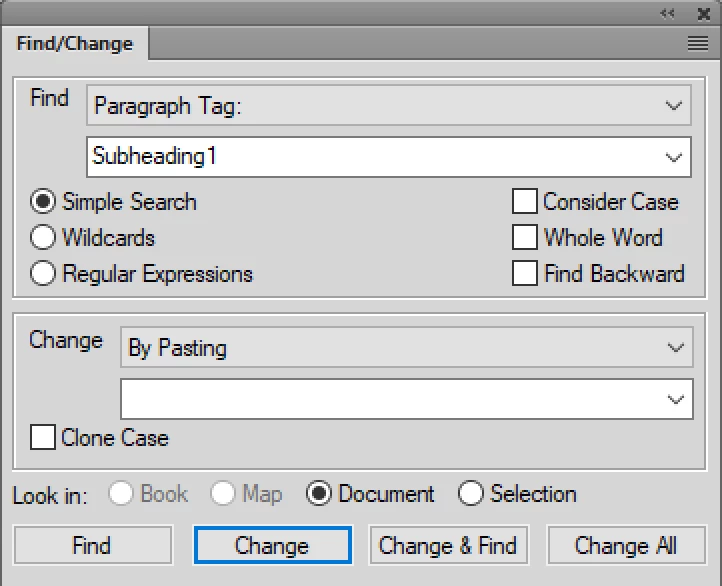
    If they don't, one option is to use a Find/Change sequence. For example, locate a top level subhead. Let's say it was called Subheading1 in the original template. Assign the new tag, let's call it Heading1. Then right click the paragraph > Copy Special > Copy Paragraph Format to copy the Heading1 format to the clipboard. Then F/C the rest:

    1. Edit > Find/Change

    Find: Paragraph tag: Subheading1

    Change: By Pasting

    1. Remove the old Subheading1 from the catalog.
    ~Barb

    4 replies

    Participant
    January 19, 2018

    Thank you Matt and Barb! This method is working.  It will save some much needed time from a tedious task.

    Barb Binder
    Community Expert
    Community Expert
    January 19, 2018

    Always happy to help, Virginia.

    ~Barb

    ~Barb at Rocky Mountain Training
    Matt-Tech Comm Tools
    Community Expert
    Community Expert
    January 3, 2018

    I had to do exactly what you are asking about earlier this year...I mapped someone else's FrameMaker formats to my own template in just a few hours using Rick Quatro's FindChangeFormatsBatch plugin.

    I mapped

    • paragraph styles
    • character styles
    • master pages

    from the old doc to my new formats.

    If needed, I could have also mapped

    • conditions
    • xrefs
    • variables
    • markers

    Best of all, you can remove the old formats from your catalogs at the same time, and because your work is stored in an Fm table, you can convert future docs to the same format with ease.

    This is hands-down the most valuable plugin I've ever used and at $80, it will pay for itself the day you first use it.

    -Matt

    -Matt Sullivan, FrameMaker Course Creator, Author, Trainer, Consultant
    Barb Binder
    Community Expert
    Community Expert
    January 3, 2018

    Hi Virginia:

    I just ran across another question on the forum about this script:

    FrameMaker Super Find / Change Reloaded – Adobe Technical Communication Blog

    which will greatly simplify this process for you. I had forgotten all about it.

    ~Barb

    ~Barb at Rocky Mountain Training
    Barb Binder
    Community Expert
    Barb BinderCommunity ExpertCorrect answer
    Community Expert
    January 3, 2018

    If the names match, they will map automatically, replacing the old formatting with the revised formatting when you import the formats. Ideally, use the same names.

    If they don't, one option is to use a Find/Change sequence. For example, locate a top level subhead. Let's say it was called Subheading1 in the original template. Assign the new tag, let's call it Heading1. Then right click the paragraph > Copy Special > Copy Paragraph Format to copy the Heading1 format to the clipboard. Then F/C the rest:

    1. Edit > Find/Change

    Find: Paragraph tag: Subheading1

    Change: By Pasting

    1. Remove the old Subheading1 from the catalog.

    ~Barb

    ~Barb at Rocky Mountain Training