Participant
November 15, 2023
Answered

Marker-Text does not appear on the search screen (FrameMaker2022)

  • November 15, 2023
  • 4 replies
  • 482 views

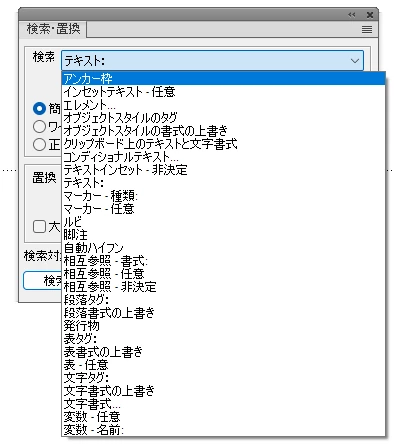
"Marker-Text" does not appear on the search screen.
Frame Maker version is 17.0.2.431. (Frame Maker2022). It is used in Japanese.

Seven other people besides me have FrameMaker2022 installed.

We are all on the same team and use the same model of PC.

This has not happened to anyone but me.


Search screen (Japanese) is attached.

”Marker Text" is "マーカー - テキスト" in Japanese.
    This topic has been closed for replies.
    Correct answer sumitoo61380105

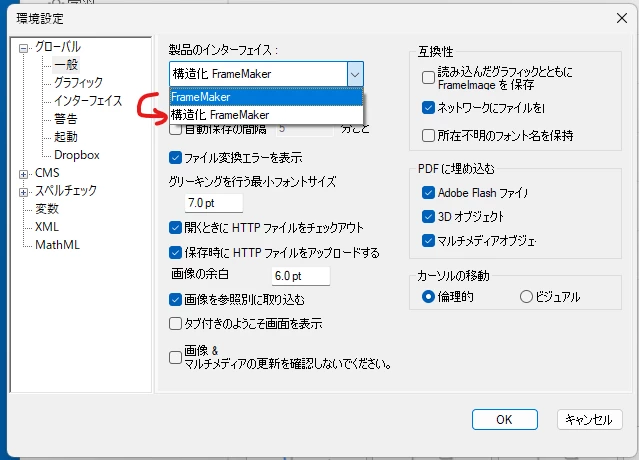
    We have found that this symptom becomes an error when the product interface item is set to "Frame Maker" in the settings screen, and becomes normal when set to "Structured Frame Maker".

    Thank you for support.


    4 replies

    Community Expert
    November 26, 2023

    Hi, @sumitoo61380105 ,

    here with FM 17.0.3.546 I have access to "Marker - Text" with normal interface and with structured interface.

    Maybe it was a bug and with 17.0.3.546 it is solved.

    Regards

    Stephan

    Participant
    November 26, 2023

    > So the others are all working in Structured FM, but you weren't?

    Yes.
    We are not using the structured feature.

    I am using it in the "FM" but realized too late that other members were using it in the "Structured FM".


    > Maybe it was a bug and with 17.0.3.546 it is solved.

    Thank you for more information.

    The version control of the Frame Maker is being done by the IT team.

    We have applied for an upgrade (update3; ver. 17.0.3) and hope the issue will be resolved.


    Jeff_Coatsworth
    Community Expert
    Community Expert
    November 24, 2023

    So the others are all working in Structured FM, but you weren't?

    Jeff_Coatsworth
    Community Expert
    Community Expert
    November 16, 2023

    So it was ok before, but now it's started misbehaving - that it happens with all docs implies that something has impacted FM on your machine. Maybe it was a Windows update, maybe something damaged your FM copy. Your idea of removing (you can also just rename it) that FM working folder was good - that often fixes weird things. If you find that a reinstall still doesn't work, I suggest contacting the FM folks - see https://helpx.adobe.com/contact/enterprise-support.other.html#framemaker for your Adobe Support options. I'd recommend using the tcssup@adobe.com e-mail address as it reaches a team dedicated to Technical Communication Suite products including FrameMaker.

    sumitoo61380105AuthorCorrect answer
    Participant
    November 24, 2023

    We have found that this symptom becomes an error when the product interface item is set to "Frame Maker" in the settings screen, and becomes normal when set to "Structured Frame Maker".

    Thank you for support.


    Jeff_Coatsworth
    Community Expert
    Community Expert
    November 15, 2023

    Let's try some basic troubleshooting - was this happening before? If not, what's changed on your machine that the others have not happen? Does it happen with any FM doc or just a specific one(s)? Have you tried uninstalling & reinstalling FM? 

    Participant
    November 16, 2023

    Jeff Coatsworth san,

    Thanks for the reply.

    > Was this happening before?

    No. This happening is first time.

    > If not, what's changed on your machine that the others have not happen?

    My machine was purchased at the same time as the another machine, which are the same model.

    > Does it happen with any FM doc or just a specific one(s)?

    This phenomenon occurs for all docs.


    > Have you tried uninstalling & reinstalling FM?


    I have tried deleting the following folders but no change.
    C:\Users\(user name)\AppData\Roaming\Adobe\FrameMaker\17


    I haven't tried uninstalling & reinstalling yet. I use FM in our daily work and cannot test them immediately. I will report the results when I reinstall.


    Thank you.