ashrae-editor
Known Participant
August 15, 2025
Answered

Master Page Changes not Applying

  • August 15, 2025
  • 6 replies
  • 526 views

I have a document using a template with modified right and left master pages that allow room for sideheads. 


I'm trying to remove the sideheading space and apply the changes to every page in the document. 


I unticked "Allow room for sideheads" in the object properties for both master pages and switched back to body page view, specifiying to remove overrides. 


The new changes aren't reflected in the body pages, and I'm not sure why. I tried applying Right/Left master to pages to the fulld document flow, but nothing happens. 


Stranger still, I created a fresh FM document and imported styles from the previous file, and it applied side heads to my body page, even though the master pages specify no room for sideheads. 


Thoughts? Thank you!

    Correct answer frameexpert

    It's interesting how this looks internally: Text Frames have three sidehead properties matching what you see in Object Properties:

    But there is a Flow property that actually toggles sideheads on or off for the corresponding Flow:

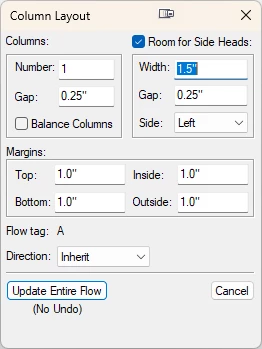
    After you set the Text Frame properties on the master pages, go to the first body page, click in the Text Frame and choose Format > Page Layout > Column Layout and you will see this dialog box, where you can update the entire Flow.


    6 replies

    frameexpert
    Community Expert
    frameexpertCommunity ExpertCorrect answer
    Community Expert
    August 18, 2025

    It's interesting how this looks internally: Text Frames have three sidehead properties matching what you see in Object Properties:

    But there is a Flow property that actually toggles sideheads on or off for the corresponding Flow:

    After you set the Text Frame properties on the master pages, go to the first body page, click in the Text Frame and choose Format > Page Layout > Column Layout and you will see this dialog box, where you can update the entire Flow.


    ashrae-editor
    Known Participant
    August 18, 2025

    That did it, thank you! 

    Community Expert
    August 18, 2025

    Hi,

    I have problems with this feature myself.

    When I create a new file and apply side heads to the master page, I still do not have side heads on the body page.

    I would have thought that the side heads feature is something which you set on the master page or a feature of the text frame.

    However, it is a feature of the text flow. Therefore you have to set this on the body page.

    I do not know without testing what format you have to import to change side heads.

    Best regards, Winfried

    Community Expert
    August 16, 2025

    Might this be about the stylesheet? When you work with Sidehead,  you have to specify that some paragraphs are to send the text to Sidehead, rather than In-Column. 


    Bjørn Smalbro - FrameMaker.dk
    ashrae-editor
    Known Participant
    August 18, 2025

    Hi, Bjorn. I'm not sure I follow. I no longer want side heads in the document, so I've removed them by modifying the text frames via the object properties menu in master page view. I expect the changes to automatically propogate to the body pages when I transition back to body page view, but they don't. I wouldn't need to apply side heads in the pagination tab for sideheads that should no longer exist in the document should I? 

    Dave Creamer of IDEAS
    Community Expert
    Community Expert
    August 15, 2025

    Assuming your don't have multiple text flows (A and B), you don't "Apply Master Pages" unless you set up the apply master page reference page table. You want to USE a master page (Master Page Usage). 


    David Creamer: Community Expert (ACI and ACE 1995-2023)
    ashrae-editor
    Known Participant
    August 18, 2025

    Hi, Dave. Neither works. I tried specifying (using) master pages to reset to the default Right/Left for all pages, but there was no change. I also tried changing everything to a landscape right page (which worked) and then changing everything back to the default right/left pages, which did not (side heads returned to body pages, even though they'd been removed from the master pages).

    Bob_Niland
    Community Expert
    Community Expert
    August 15, 2025

    ashrae-editor: I unticked "Allow room for sideheads" in the object properties for both master pages and switched back to body page view, specifiying to remove overrides. 

    Did you perform a
    Format🞃 Page Layout› Apply Master Pages…

    This can also be done from the Update Book menu.

    Jeff_Coatsworth
    Community Expert
    Community Expert
    August 15, 2025

    Structured or Unstructured? FM version?

    ashrae-editor
    Known Participant
    August 15, 2025

    Should've specified, thanks, Jeff. 

    Unstructured FrameMaker 2019, Version: 15.0.8.979