

"Master Page Usage" pane: Even and Odd page assignments (Left/Right) are reversed on some docs
[Note: This occurs on FM2017 (coworker) and FM2019 (me).]
A coworker ran across this with one of our books.
Not sure how long it's been like this, or how it happened.
*All* of our docs work off a template in which all docs (front cover, preface, chapters, appendices) use a First master page for the first page, and a Left page on even page numbers, and a Right page on Odd page numbers.
e.g. In the Apply To section, we always have checkboxes that say "Even (Left) Odd (Right)".
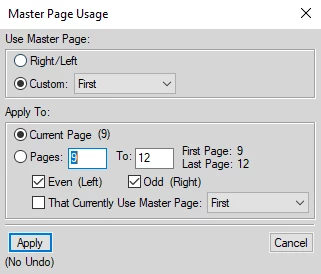
However, in some of the documents in this book (the cover, the preface, and *some* of the chapters), the pane shows "Even (Right) Odd (Left)"
e.g.
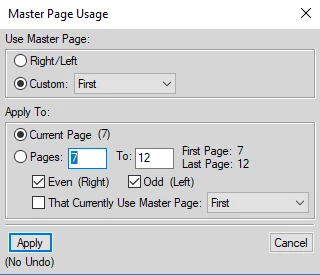
I have no idea how this happened, or how to fix it.
I did a workaround by opening corresponding documents from another book (a cover, a preface, and a chapter), and then imported Document Properties from those docs into the messed up docs. (Which worked.)
So...
Questions:
- How could this have happened? (Is there some keycombo that may have messed it up?)
- How does one change "Even (Right) Odd (Left)" to "Even (Left) Odd (Right)", in case this happens again?
Thanks!


 AdChoices