
Participant
May 23, 2024
Question

Master Table of Contents hyperlink destination

  • May 23, 2024
  • 2 replies
  • 631 views

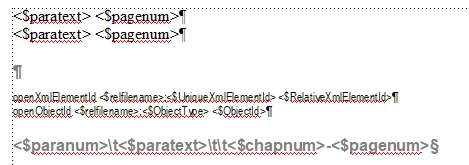
In all of my books that have a MTOC and Chapter TOCs, clicking on one of the MTOC links takes me to the first page of the chapter. I would rather be taken to the first page of the chapter TOC, but I can't figure out where to change that information. This is my TOC reference table:
 

Appreciate any help!


    This topic has been closed for replies.

    2 replies

    Barb Binder
    Community Expert
    Community Expert
    May 25, 2024

    Hi @MoonPigeon1965:


    I keystroked what I think you are asking for: how to link the book TOC to a stand-alone TOC entry (instead of the normal pararagaph within a FrameMaker file).


    I pulled in Heading1TOCs and Heading2TOCs from the standalone file and as @Jeff_Coatsworth predicted, I ended up with Heading1TOCTOC and a Heading2TOCTOC. 


    But then it gets weird. It pulls in both the page numbers from the actual chapter files, then adds a tab and then adds the stand-along page numbers. There's nothing on the TOC reference to support this behavior—my best guess is Fm is trying but just can't quite pull it off. I've been using FrameMaker since the early 90s and I've never seen this question—how to link one TOC to another TOC. (I saw it recently on the InDesign forum, keystroked it and InDesign simply refused to produce any content at all, so at least FrameMaker is trying. 😊)


    The links work and if you really want to do this, you could manually remove the extra page tab/numbers after each update or at least before the final output.


    ~Barb

    ~Barb at Rocky Mountain Training
    Barb Binder
    Community Expert
    Community Expert
    May 24, 2024

    Hi @MoonPigeon1965, and welcome.


    A mini-TOC is just a list of headings in a single FrameMaker file—it can't link to an outside file. I think you are using the term Chapter TOC to refer to a stand-alone TOC, but a stand-alone TOC is its own .fm file so the miniTOC can't see it.


    You can create a list of cross-references to link to other files. The list can look identical to a TOC list (mini, stand-alone or book), and it updates with the book, but it is fussier to set up.


    ~Barb

    ~Barb at Rocky Mountain Training
    Participant
    May 24, 2024

    Since I used the wrong terms, I'm not sure if I described my question correctly.  This is one of my FrameMaker-generated Master TOCs:

    When I click on "editorial standards", it takes me here, the first page of chapter 1 (which is in the same book):

    What I want to do is take the reader here, which is the stand-alone TOC for the Editorial Standards chapter:

    Is this possible to do? Thanks again!


    Jeff_Coatsworth
    Community Expert
    Community Expert
    May 24, 2024

    Let's see your .book layout where each of these elements/files is shown.