
Participating Frequently
November 23, 2018
Answered

Math font problems in v15.0.1.430

  • November 23, 2018
  • 1 reply
  • 524 views

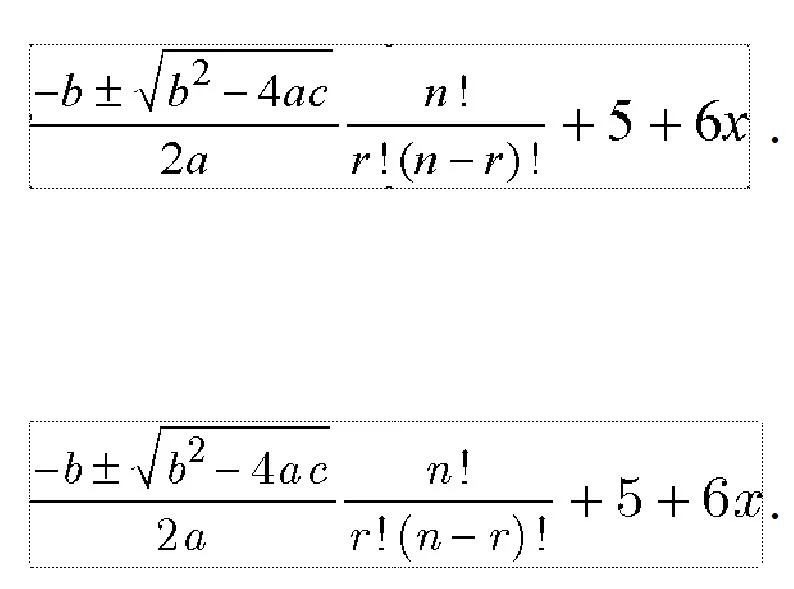
Hi, I was using the trial version of Framemaker 2019 v15.0.0.393 and the mathflow equation editor in structured mode (the settings were set to apply the paragraph style with the Euclid font), and after the update to v15.0.1.430, each time I insert an equation, only the default font for math is used, is the same document, above is the inserted equation after the framemaker update, below is the correct font being used, is there a way to reset the font settings ? or How can I make mathflow use the font I want and framemaker to display it correctly ? (the saved pdf does not use the Euclid font either)

Any help is much appreciated
    This topic has been closed for replies.
    Correct answer saurabhatadobe

    Hi,

    We are aware of this issue. This is being looked into and a fix will be available in next upcoming update.

    Regards,

    Saurabh

    1 reply

    Bob_Niland
    Community Expert
    Community Expert
    November 23, 2018

    This older thread might have several things to try (e.g. embed joboption):

    Problems with MathFlow Equation

    Participating Frequently
    November 23, 2018

    I'll take a closer look, specially the video, I tried uninstalling everything, even with the Adobe CC clean up utility, restarting my win8x64 and re installing mathtype 6.9b, the new version of framemaker, and the problem is I see the correct font in the Mathflow editor but not in the rendered page of framemaker, neither in the output pdf, is like framemaker is ignoring the font is even selected or installed

    Jeff_Coatsworth
    Community Expert
    Community Expert
    November 23, 2018

    There may be a newer update out for FM2019 that addresses issues with math stuff (IIRC).