
Known Participant
October 12, 2022
Answered

Mini TOC Formatting

  • October 12, 2022
  • 2 replies
  • 950 views

Hi,

There are some instances in my document where the heading titles continue onto a second line of text. When this happens, my mini TOC does not format correctly. I'd like for the second line in the mini TOC to format like the first line, with the leader dots and chapter/page numbers on the right of the page. Is there a way to do this?


Mini TOC:
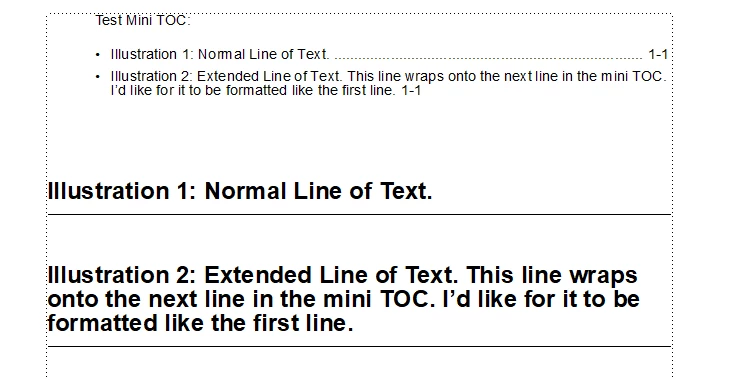
Reference Page:



Thank you in advance.

Nick Caggiano

    This topic has been closed for replies.
    Correct answer Matt-Tech Comm Tools

    Thank you. One final question. Is there a way to get the top line to break after the word Bell instead of the word Crank as seen below?


    Place an additional nonbreaking space between Crank and Mounting. This will force "Crank Mounting" to be considered as a single word.

    (for other readers, this is not necessary if using Fm 2022, and the last line right indent property)

    2 replies

    Known Participant
    October 12, 2022

    The second tab worked, but now I have the following issue. Is there a fix to wrap the chapter/page numbers to the next line with the leader dots when the text goes to the end of the first line?


    K.Daube
    Community Expert
    Community Expert
    October 13, 2022

    The hyphen on the reference page between <chaptnum> and <pagenum> must be 'nonbrakable'. Inset it by ESC, -, h 

    Known Participant
    October 17, 2022

    Thank you. One final question. Is there a way to get the top line to break after the word Bell instead of the word Crank as seen below?


    K.Daube
    Community Expert
    Community Expert
    October 12, 2022

    Add a second TAB (and propably a third one due to > 2 lines) in front of the <$chapnum> item.

    Known Participant
    October 12, 2022

    That did it! Thank you.

    Nick

    Matt-Tech Comm Tools
    Community Expert
    Community Expert
    October 12, 2022

    Make sure to look at the new option to manage last line right margin in Fm 2022. This makes TOC management much easier.

    (I hope you like the video I did on the topic!)

    -Matt Sullivan, FrameMaker Course Creator, Author, Trainer, Consultant