
Oleg_Shynkarenko
Known Participant
May 14, 2021
Answered

Mirrored shadow letters in titles

  • May 14, 2021
  • 2 replies
  • 569 views

I guess, many noticed these grey mirrored shadow letters in titles of some templates:
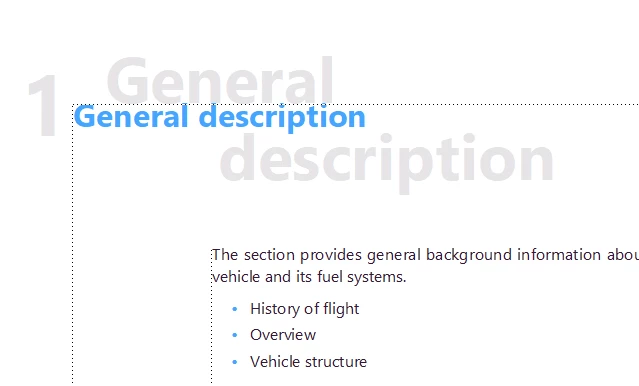
How to get access to it in some settings to delete or to set it up in a different way?

This topic has been closed for replies.
Correct answer Jeff_Coatsworth

Sorry, Master page

2 replies

Jeff_Coatsworth
Community Expert
Jeff_CoatsworthCommunity ExpertCorrect answer
Community Expert
May 14, 2021

Sorry, Master page

Oleg_Shynkarenko
Known Participant
May 14, 2021

Oh! Now I see. I just need to change color of the shadow from grey to white. And it becomes unvisible. But how to create this shadow by himself in any document?

Community Expert
May 17, 2021

When you need this text in all other documents, then import the master pages and paragraph formats into the other files.

However, be careful! There are files like TOC or title pages or copyright pages which should keep there own layout!

Jeff_Coatsworth
Community Expert
Community Expert
May 14, 2021

Probably on the Reference page

Oleg_Shynkarenko
Known Participant
May 14, 2021

There is something very strange. It does not look like an ordinary refence page. It is some HTML mapping table. I found there Chapter Title, but I have no idea how to edit this shadow. Should I delete the mark "throw away" or change it to N?

Community Manager
May 16, 2021

No, this is the HTML Mapping Table. This has nothing to do with the "shadow" effect.

As Jeffe mentioned, the shadow paragraph is on the Master Page.

See also your other post, where I have answered how to edit it.


P.S.: For everyone who wants to look at it, it's one of the sample file shipped with newer versions of FrameMaker here:

C:\Program Files\Adobe\Adobe FrameMaker 2020\Samples\UserGuide(Arabic,English,Hebrew)\English