
Missing DLL being reported on XML file load
Hi
I have FrameMaker 2022 17.0.5.725 installed on my laptop and use it to maintain a structured application which requires XSL transformations on XML load and save. I have a modified maker.ini file which specifies a different path for the SAXON XSL processor rather than the one which us delivered with FrameMaker. Everything is working fine in my environment.
This week I have been inducting a colleague into the FrameMaker world so that they can take over some of the responsibilities for the application. We've installed the identical version of FM, correctly specified the Saxon path for their environment, and gone through loading, editing and saving a number of our documents. So far as we can tell the inputs and outputs are identical, but when their FM runs the import or export XSL transform, their FM console echoes the following line hundreds or thousands of times:
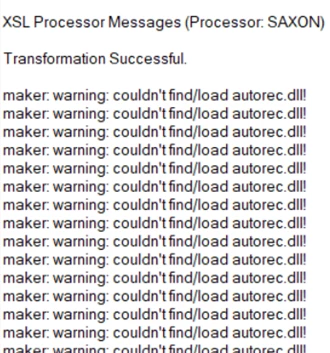
There are two autorec.dll libraries, one is in "Program Files\Adobe\Adobe FrameMaker 2022\Legacy32" and the other is in "Program Files\Adobe\Adobe FrameMaker 2022\filters". Both of us have both of these libraries. I presume it is the DLL in filters that is being accessed (or not), but I cannot for the life of me see why my installation is locating it while my colleague's is not.
It's not a maker.ini problem or a failed installation/upgrade. I'm not sure what else it could be though. The DLL is there, my laptop sees it, theirs does not.
Anything else I could check?
cheers
T


 AdChoices