


Missing Left Master Page
FM 12.0.4.445, Windows 7
My book's TOC file "lost" its Left master page. When I tried to apply the Left master page, it was not listed:
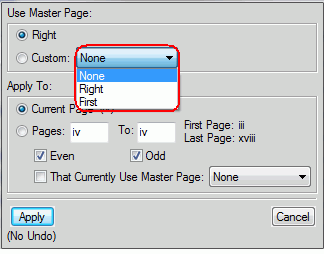
I was able to fix this by deleting the existing TOC, then re-creating it and applying the formats of another book's TOC file, but I'd like to know what happened and if there is any other solution besides deleting/recreating the file. The page formatting (First, Left, Right) was correct in the previous version of this book, and nothing was done to the TOC file other than to update the book/re-generate the TOC.
One other note - at one point after a book build (I presume), buried under the FM window was an error box stating something to the effect that the UnstructMasterPageMaps table was missing and a new one would be added. That table was recreated (no tags are mapped to master pages in the TOC file). Oh, and I did update all my Adobe products last week, and I think FM was among them.
Can anyone shed any light on this glitch? Thanks very much.
 AdChoices