
Participating Frequently
October 23, 2018
Question

Missing Next Page Button

  • October 23, 2018
  • 2 replies
  • 820 views

Hey Barb

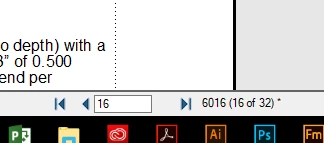
So I couldn't find any subjects that talk about this but I have recently installed Adobe FrameMaker 2019 on my machine and a few others in my group and a couple of us are missing the "Next Page" arrow at the bottom where the pages are identified.  As you can see the back arrow is there (next to 16), but not the forward arrow.  I can not find a setting for this and was wondering if I just needed to copy some .ini files from a user whose button is there or is this an install issue??  Its not a huge issue but I was just curious if you had seen this before.  Thank you for your help.
    This topic has been closed for replies.

    2 replies

    LinSims
    Community Expert
    Community Expert
    October 23, 2018

    Hi Richard,

    I think this bug has already been reported to Adobe. You can check here: https://tracker.adobe.com/#/view/FRMAKER-5254

    I got an email from them this morning (because I voted for it) that the development team is In Test for resolving the issue.

    Participating Frequently
    October 23, 2018

    Thanks barb, I got the same email from another person. I appreciate the

    heads up!

    Barb Binder
    Community Expert
    Community Expert
    October 23, 2018

    Hi Richard:

    That's a new one to me. What version of FrameMaker?

    And I noticed that you are on page 6016. Does it happen when you only have three digits? I.e, 601?

    ~Barb

    ~Barb at Rocky Mountain Training
    Barb Binder
    Community Expert
    Community Expert
    October 23, 2018

    Well, that is the issue.

    My previous page button is visible until I increase the page numbers. And oddly, once increased, reducing the number doesn't return the button. I'd recommend reporting this as a bug, here: Tracker. You can reference this thread as an explanation.


    ~Barb

    ~Barb at Rocky Mountain Training
    Participating Frequently
    October 23, 2018

    Thank you Barb, kinda strange because I went into My FM directory and

    renamed the “15” folder to “15old” relaunched FM and the button was back.

    So I lost all my preferred settings so I’ll play with putting them back and

    see if there is any connection.

    On Tue, Oct 23, 2018 at 12:49 PM BarbBinder <forums_noreply@adobe.com>