
Participant
April 22, 2024
Answered

Mix of languages in FrameMaker UI

  • April 22, 2024
  • 1 reply
  • 617 views

I have just installed FrameMaker but it acts weirdly. The user interface is now a mix of English and Chinese (I think). As yo can see in the screenshot the menus are in English but a lot of the other stuff in Chinese. How do I change this?
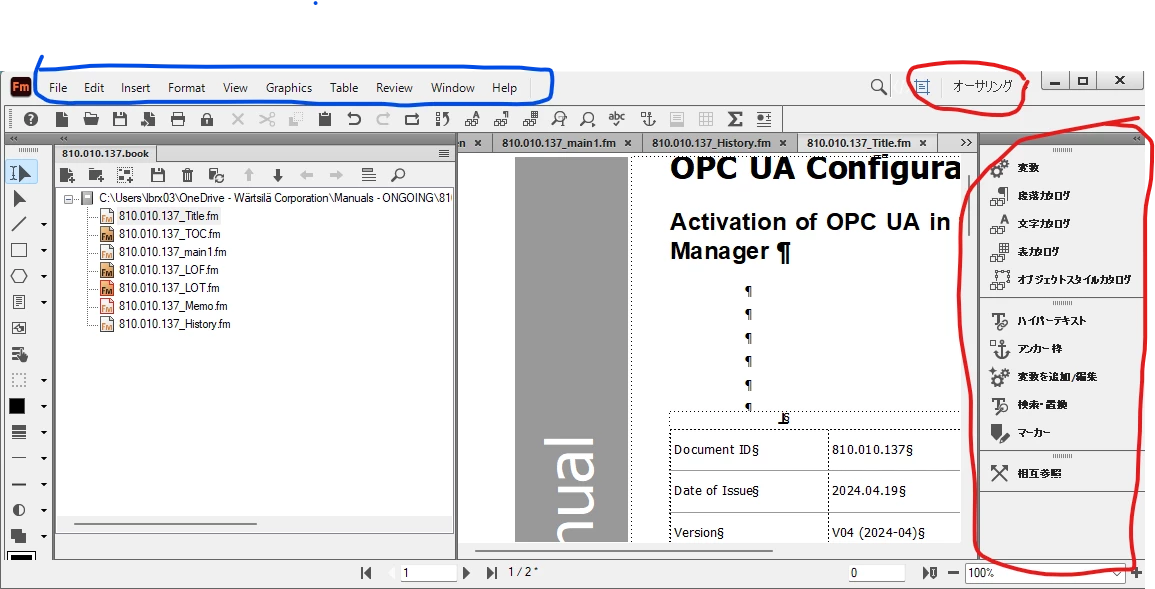
    This topic has been closed for replies.
    Correct answer Winfried Reng

    Hi,

    What's the language of your Windows interface?

    Very strange.

    In your case I would de-install and re-install FrameMaker.

    Or at least close FrameMaker and restart Windows and see, if anything has changed.

    Best regards, Winfried

    1 reply

    Winfried RengCommunity ExpertCorrect answer
    Community Expert
    April 22, 2024

    Hi,

    What's the language of your Windows interface?

    Very strange.

    In your case I would de-install and re-install FrameMaker.

    Or at least close FrameMaker and restart Windows and see, if anything has changed.

    Best regards, Winfried

    Liv5F8EAuthor
    Participant
    April 22, 2024

    My Windows interface is Danish.

    I have closed FrameMaker and restarted Windows (more than once) without effect.

    Sounds like I have to try the re-install.

    Community Expert
    April 22, 2024

    Hi fellow dane! You may also try renaming the preferences folder, which can be found here and and restart FrameMaker.

    C:\Users\USER NAME\AppData\Roaming\Adobe\FrameMaker

    Bjørn Smalbro - FrameMaker.dk