
morerows attribute inside of <entry> element is lost when using a CONREF of a row or multiple rows
I am using FM2020, structured, DITA.
I have tables in two different DITA files that share some, but not all rows. I have successfully used CONREF to share the rows for "standard-format" rows, but something is not working if there is a merged cell. In particular, if the first <entry> in a row has a morerows attribute (e.g. morerows = 1). You can see an example of the DITA file as viewed in the editor below (first two cells in the first column are merged):
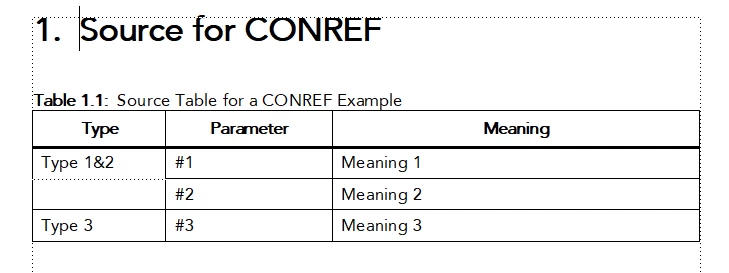
The DITA source code for the first 2 rows is:
<row rowsep="1" id="id231680M0JTS">
<entry colname="1" morerows="1">Type 1&2</entry>
<entry colname="2">#1</entry>
<entry colname="3">Meaning 1</entry>
</row>
<row rowsep="1" id="id2313L0Y045U">
<entry colname="2">#2</entry>
<entry colname="3">Meaning 2</entry>
</row>In the second DITA file, I have CONREF'd each of the rows in, and then manually inserted a new row (i.e. in this instance, I cannot CONREF the entire table because I need to have this different row...)
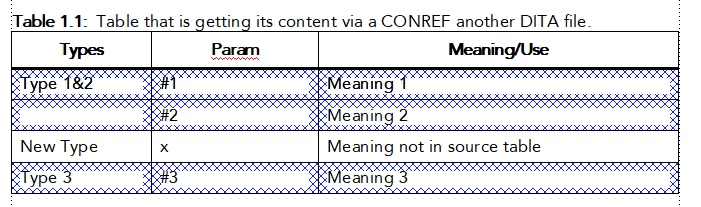
You will notice that the first two cells in the first column are no longer "merged". The following is the DITA source code for those same two rows in this second file:
<row rowsep="1"
    conref="conref_source_table.dita#sourceFile/id231680M0JTS">
<?Fm Condstart DITA-Conref?><entry colname="1"></entry>
<entry colname="2"></entry>
<entry colname="3"></entry>
<?Fm Condend DITA-Conref?></row>
<row rowsep="1"
    conref="conref_source_table.dita#sourceFile/id2313L0Y045U">
<?Fm Condstart DITA-Conref?><entry colname="1"></entry>
<entry colname="2"></entry>
<entry colname="3"></entry>
<?Fm Condend DITA-Conref?></row>
<row rowsep="1">
You can see that (a) the morerows attribute is missing from the second DITA file and (b) there is an <entry> element with colname="1" attribute for the 2nd row in the second DITA file.
Other things I have tried:
- I manually edited the DITA file to add the morerows="1" attribute and delete that <entry colname="1"> for the second row.
- Upon re-opening the file, Framemaker will ignore those changes and replace it with what is shown above.
- I inserted a CONREF that pointed to the first row and set the CONREF End Element as the second row.
- This initially "appeared" to work, in that it initially looked correct AND if I saved the DITA file and examined the source code the morerows element was present and there was no <entry colname="1"> for the second row, however, upon re-opening the DITA file, FM obliterated those and replaced it with the code above
- I added CONREFs to each of the <entry> elements, except the first one, and manually set that first one
- This obviously works, but it is hacky and fragile and not efficient.
So.... how can I have the morerows attribute get recognized/kept as part of the CONREF?


 AdChoices