
Known Participant
February 7, 2023
Question

My FrameMaker appendices aren't showing properly in the TOC (using current online version)

  • February 7, 2023
  • 3 replies
  • 706 views

I have a book with 6 Appendices at the end. I have set up the Appendices such that the first one is Appendix A (A=1) in the Autonumbering Properties, and the rest are Appendix ($chapnum). They are numbering just fine in the titles.


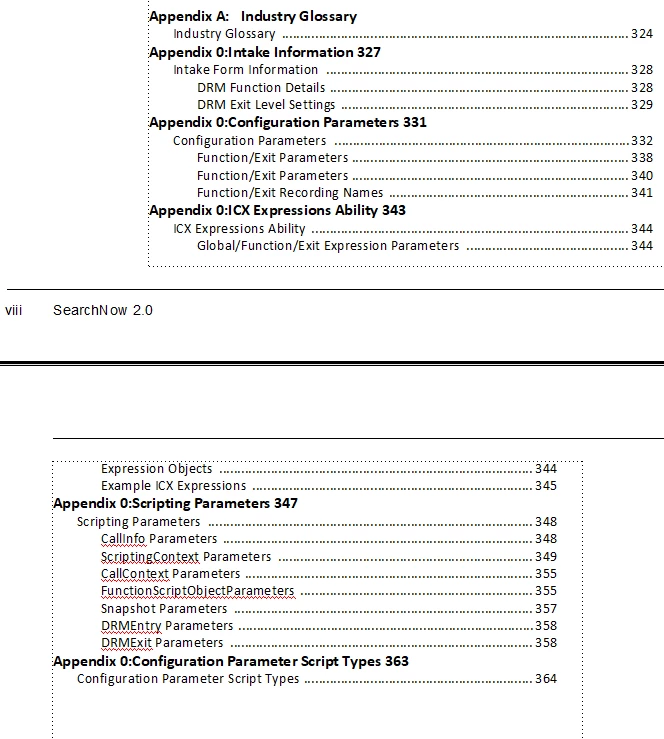
The issue comes in my TOC, which when generated, looks like this (all of the numbered ones are showing as Appendix 0)> 
 

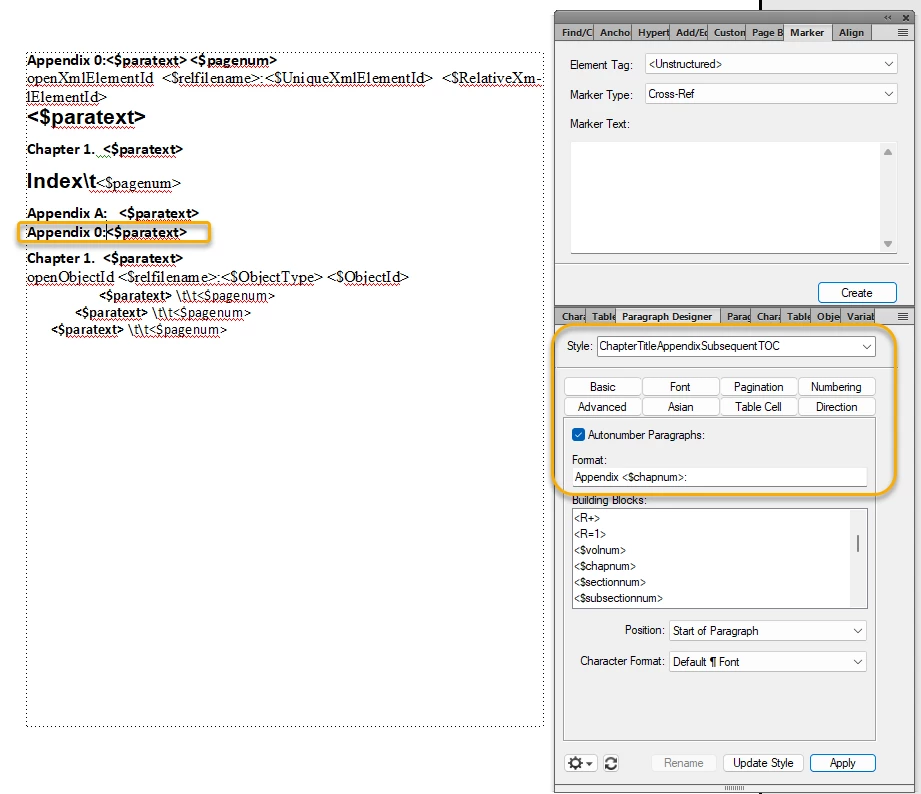
My Reference View for the TOC looks like this with the orange showing the pieces I think are the issue. Please note that my ability to edit the reference info seems to be limited for some weird reason....I can't get the Appendix 0 to change>
    This topic has been closed for replies.

    3 replies

    Barb Binder
    Community Expert
    Community Expert
    February 9, 2023

    Hi @LindaRuuts:


    I would streamline the layout and reduce the number of styles. You will need two styles for all of the chapter titles in your book: ChapterTitle and AppendixTitle, auto-numbering set as follows:

    • C:Chapter <$chapnum>: 
    • C:Appendix <$chapnum>: 


    A series label is a character followed by a colon at the beginning of the auto number property. It will separate chapter numbering from any other numbering series (i.e., lists) within the document. For more information, see, https://help.adobe.com/en_US/framemaker/using/index.html#t=using-framemaker%2FFrameMaker-2022%2Fuser-guide%2Ffrm_page_layout_pl-styles-lists-and-autonumbering.html. (I am using C: to represent the chapter series, any character will do the same thing.)


    Once you standardize the chapter titles, set the numbering at the book level, as per my earlier explanation. You do not need anything in the chapter titles that uses <n=1> because you restart and increment chapter numbers via the book window. 


    ~Barb


    ~Barb at Rocky Mountain Training
    Known Participant
    February 9, 2023

    @Barb Binder Thank you for your help. I followed the above, and while the actual Chapter and Appendix headings in the individual chapters are working out fine, within the TOC, once generated, all of my Chapter and Appendix Headings show as "Chapter 1" and "Appendix A" respectively. I've attached a screenshot.

    Known Participant
    February 9, 2023

    @Barb Binder It's gotten a bit worse now, since the Reference pages won't let me get rid of the 0's when I try to set them up. Please see the attached screenshot.


    At this juncture, I'm really lost here and am willing to hire someone to help.

    Barb Binder
    Community Expert
    Community Expert
    February 7, 2023

    Hi @LindaRuuts:


    We can simplify this:

    1. In the chapters, set all appendix titles like this. Use the same series label that you used for the numbered chapters. In my case, I'm using C: to designate the chapter number series. Appendix titles are just a different version of the chapter titles. 


    2. In the book window, right click Appendix 1 and set numbering as follows.


    3. Select the rest of the appendices and set numbering as follows. 


    4. Results in the book window.


    5. Add the AppendixTitles to the TOC, along with the other styles.


    6. On the reference page set up the AppendixTitleTOC and the ChapterTitleTOC as follows. (Note, my examples don't show page numbers, yours will be followed by a tab and the <$pagenum> building block.)


    7. Update your book.


    Numbering can be confusing in FrameMaker. Consider joining me for the my free Numbering webinar on Feb. 22.

    https://community.adobe.com/t5/framemaker-discussions/attend-framemaker-essentials-workshop-on-numbering-properties-for-free/td-p/13475435


    ~Barb

    ~Barb at Rocky Mountain Training
    Known Participant
    February 9, 2023

    Apologies Barb. I got pulled into something else yesterday and didn't have time to look at this again until now. 


    My regular chapter titles have the title "Chapter Title Subsequent" and follow a numbering format of: Chapter <n+>. I don't have a series number. What am I missing? I want to make sure I understand all of this before I redo my book incorrectly and end up with a worse mess because I am not following. 

    Known Participant
    February 9, 2023

    @Barb Binder Sorry for the second note. It's sounding like I need to make all of my regular chapters follow a different autonumbering format? They should all be Chapter <$chapnum>:  except possibly the first one that maybe should be Chapter <n=1>: ?

    Jeff_Coatsworth
    Community Expert
    Community Expert
    February 7, 2023

    Are you talking about FM2022 as the "current online version"?

    Known Participant
    February 7, 2023

    Yes.