
Known Participant
July 7, 2023
Answered

My numbering auto start at page 9 in Adobe Frame Maker, How to make it continue.

  • July 7, 2023
  • 3 replies
  • 481 views

My numbering auto start from page 9 in Adobe Frame Maker, How to make it continue. I am using FM 2022 version. I did format> document>numbering> continue from previous chapter, select auto number in paragraph designer, but nothing happended. Please guide. I sharing the screenshot.

    This topic has been closed for replies.
    Correct answer Barb Binder

    Hi Amit:


    Here's the FrameMaker rule that tripped you up: you can have a multiple numbering series in a single file, but you are only allowed to have one unnamed series. All other series need to begin with a character and a colon to differentiate them from each other. This is called a Series Label.


    In your document, you have numbered headings as one series, and you have an alphanumberic list as a second series. I added an L: to both of the paragraph styles in your list, and that took care of the issue. You could do it the other way, if you prefer: add an H: to your heading styles and leave the lists alone.


    The key is to note that these are two separate lists, and FrameMaker cannot differentiate between them, unless you tell it to.


    ~Barb
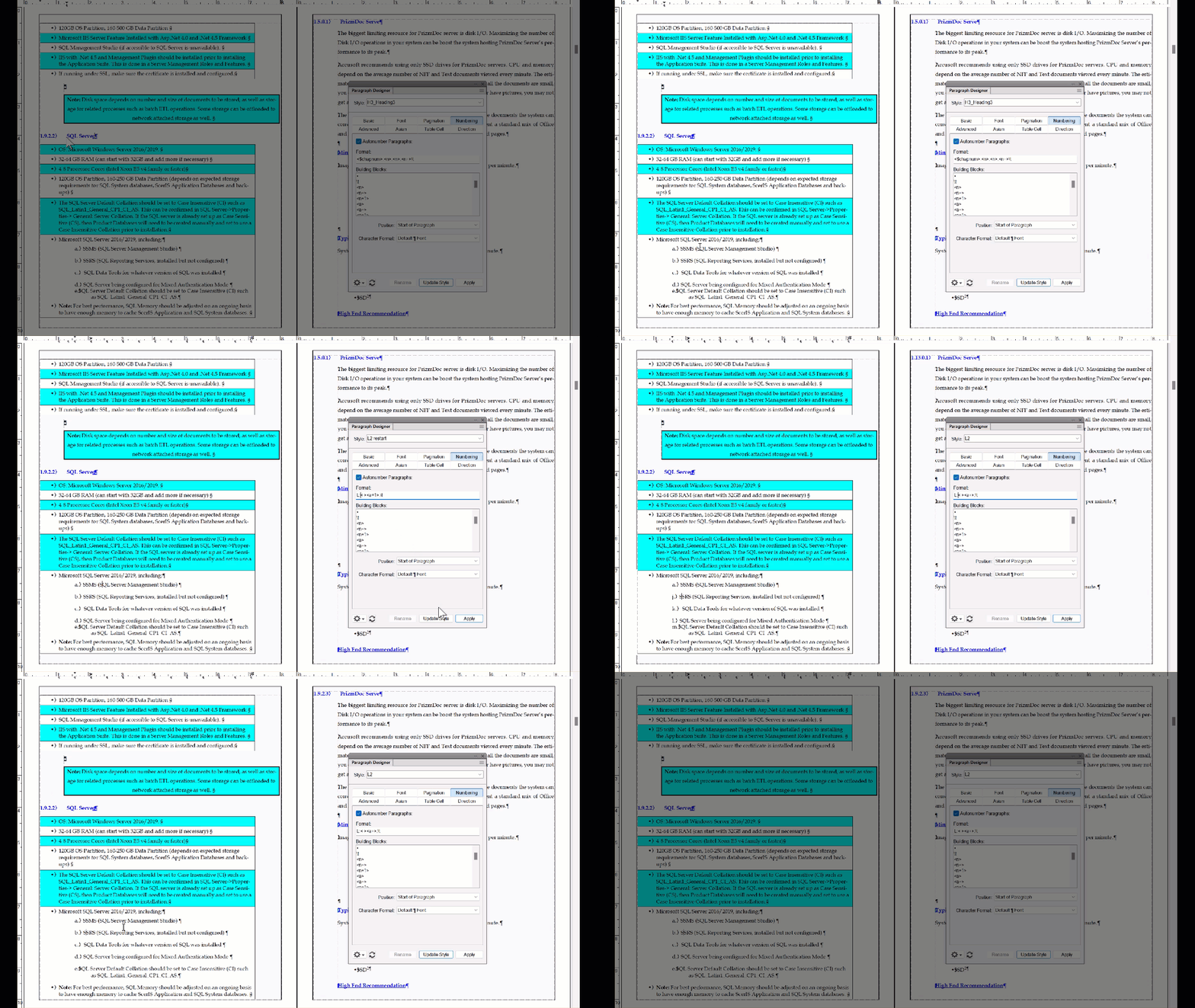
     

    3 replies

    Barb Binder
    Community Expert
    Barb BinderCommunity ExpertCorrect answer
    Community Expert
    July 9, 2023

    Hi Amit:


    Here's the FrameMaker rule that tripped you up: you can have a multiple numbering series in a single file, but you are only allowed to have one unnamed series. All other series need to begin with a character and a colon to differentiate them from each other. This is called a Series Label.


    In your document, you have numbered headings as one series, and you have an alphanumberic list as a second series. I added an L: to both of the paragraph styles in your list, and that took care of the issue. You could do it the other way, if you prefer: add an H: to your heading styles and leave the lists alone.


    The key is to note that these are two separate lists, and FrameMaker cannot differentiate between them, unless you tell it to.


    ~Barb


    ~Barb at Rocky Mountain Training
    Known Participant
    July 10, 2023

    Yes, your solution worked like a champ. Thank you very much!

    Barb Binder
    Community Expert
    Community Expert
    July 7, 2023

    Hi Amit;


    Your cursor is in a body paragraph in that screenshot so we can't see how your numbering is set up. Click in the heading and share another one please.


    If that looks OK, then be sure that you return to the book file, select chapters 2 through the end, right click the selected chapters in the book file and choose Numbering > Continue from Previous File in Book, and then update the book. Does that take care of it?

    ~Barb

    ~Barb at Rocky Mountain Training
    Known Participant
    July 8, 2023

    I did that, but nothing happened. pls check the screenshot in the attachment.

    Community Expert
    July 7, 2023

    Your numbering scheme does not look right in the screenshot you have provided. Numbering can be controlled on the book level and the document level. I believe you need to look at your books numbering properties. This is what the numbering code should look like. Or something akin to this:


    Bjørn Smalbro - FrameMaker.dk