


Participating Frequently
August 7, 2013
Question

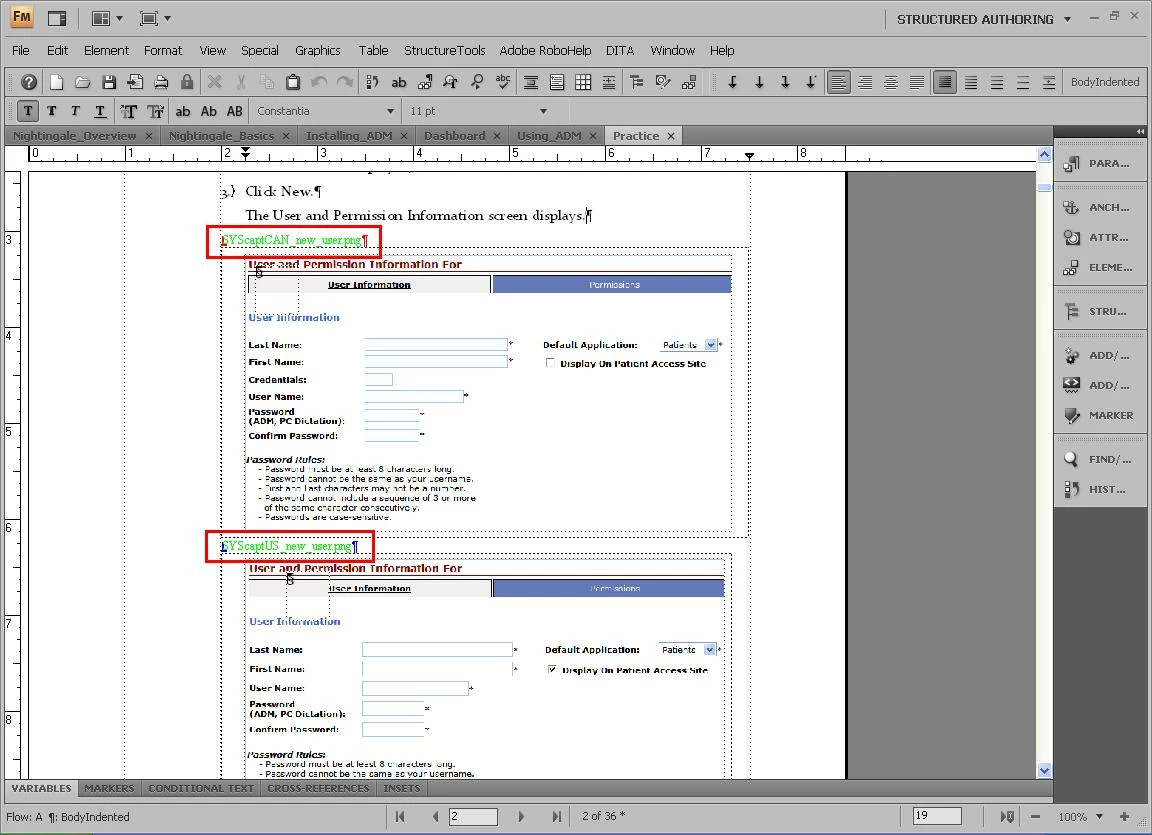
Name of images display in Framemaker

  • August 7, 2013
  • 1 reply
  • 439 views

Hello,

The name of the images I add show up above the image in green text. When I produce the output, it shows up in the final product of the help file. It happens to some files but not to others. Is this a feature I can turn off? I want to avoid going through every document and manually delete it.

Thanks

Lynn

By the way, I am using Framemaker 9
This topic has been closed for replies.

1 reply

Arnis Gubins
Inspiring
August 7, 2013

Lynn,

It looks like the names may be either conditional text or set up in a Color View.

Using the Charater Designer, place the cursor in the middle of the green file name and check to see what colour name is being used.

Then use the View > Color > Views to check to see if this green colour is set to be "Invisible" in any of the six views.

If it is, then switch to that view. You can also easily switchthe colour views using the esc v v # shortcut, where # is a number between 1-6 representing the allowed view.

If it is not, then in VIew 1 set that colour to be invisible and in View 6 set it to be visible. Then toggle between the views using the shortcut to turn off the filenames.