

JSigrist
Participant
August 17, 2020
Answered

Need a table Header Row to show current page # of total pages

  • August 17, 2020
  • 2 replies
  • 630 views

FM, unstructured, 2019. Created a table on body page that has a header row that includes a block that needs to show the current page # & the total page # in a cell. Is there any way to add a variable on the text page that will show the current page number in the cell when additional pages are added to the file? Also the page numbers in that block do not relate to the page numbering that shows in the footer of the document set up on the master page.
This topic has been closed for replies.
Correct answer barbara_a7746676

I am confused by the description of the issue and have the same question as Bob Niland. 

If you are trying to add a variable with the number of table sheets, you can click inside a table header cell or a table title and choose Table > Insert Table Variables, and choose Table Sheet (Sheet number of total count).

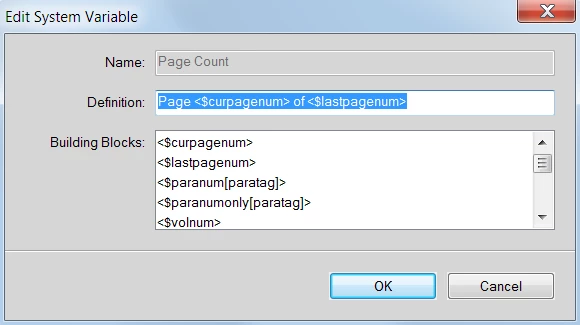
If you are trying to insert the actual document page number, click inside the table cell and open the Variables panel, select Page Count. Then click the edit button and change it to something similar to this:

2 replies

barbara_a7746676
Community Expert
barbara_a7746676Community ExpertCorrect answer
Community Expert
August 18, 2020

I am confused by the description of the issue and have the same question as Bob Niland. 

If you are trying to add a variable with the number of table sheets, you can click inside a table header cell or a table title and choose Table > Insert Table Variables, and choose Table Sheet (Sheet number of total count).

If you are trying to insert the actual document page number, click inside the table cell and open the Variables panel, select Page Count. Then click the edit button and change it to something similar to this:

LinSims
Community Expert
Community Expert
August 18, 2020

A little experimentation yesterday showed that the <$lastpagenum> variable returns the value of the last page number of the file or, if it is in a multi-file book, the value of the total number of pages UP TO THAT FILE.


If your document is only one file long it will, of course, return the value you're looking for, but if you have a multi-file book, it may not, depending on which file your table is in. For example, if your table is in the 4th file of a 5 file book with continuous page numbering and each file has, say, 10 pages in it, <$lastpagenum> will return the value of 40, not 50. 

Bob_Niland
Community Expert
Community Expert
August 17, 2020

Is this the total page # in the local table, or in the document to that point?

JSigrist
JSigristAuthor
Participant
August 18, 2020

Thank you. I was able to solve the problem using the Table Sheet variable.