
DJTOregon
Known Participant
July 16, 2019
Question

Need to move line/footer

  • July 16, 2019
  • 2 replies
  • 427 views

Hello,

I was wondering if someone could please lend some knowledge. I need to move the header and footer information in the below document.

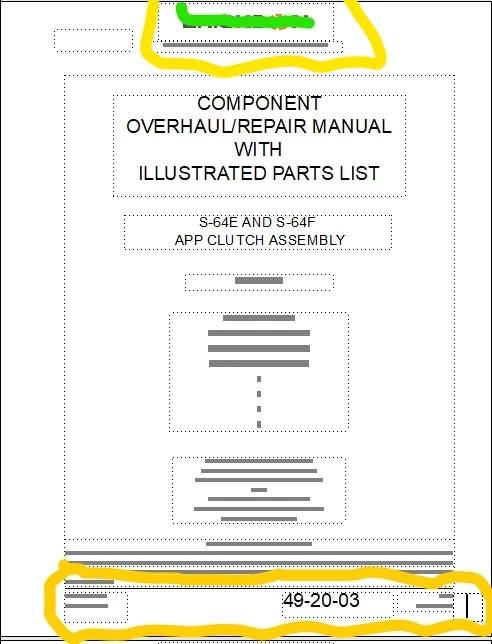
I need to move the footer information including the line circled below up 1/8 inch in my document. All of this is located on the master pages. Obviously I can eyeball 1/8 inch using the ruler on the side, but is there a way to get it exact? I need this for printing purposes.

Second, I need to move the header down 1/8 inch. I used green to cross off the logo for confidentiality purposes, but this with the gray text needs to be moved down. Any ideas on how I can be exact on this? There are like 16 chapters in my book.

Thank you!
    This topic has been closed for replies.

    2 replies

    Barb Binder
    Community Expert
    Community Expert
    July 17, 2019

    Hi DJTOregon:

    I agree that Graphics > Object Properties > Dimensions is the way to go when you need precision.

    One other method worth mentioning though is to use the Select Object tool in View > Toolbars > Graphics Toolbar, which will allow you to select a frame and adjust size and position with drag and drop. While you are in the process of moving or resizing the frame, glance down at the status bar (lower left corner, right above the Windows Start menu)—you will see either the new X,Y coordinates (while moving a frame) or the W,H coordinates (while resizing the frame).

    ~Barb

    ~Barb at Rocky Mountain Training
    Bob_Niland
    Community Expert
    Community Expert
    July 16, 2019

    Using the graphic cursor, right-click on the frames, Object Properties, Dimensions. Set 'em as needed.

    It sort of looks like whoever laid out those pages did it by eye. Might be worthwhile to define them all precisely, and update the enterprise style guide and templates.