Gene Sorg
Participant
July 17, 2019
Answered

Newbie Question #3: Modifying Table Data

  • July 17, 2019
  • 1 reply
  • 480 views

How do I navigate a table and add data to it? For instance:

var hero = ['Superman', 'Spiderman', 'Wonder Woman'];

var fName = ['Clark', 'Peter', 'Diana'];

var lName = ['Kent', 'Parker', 'Prince'];

to
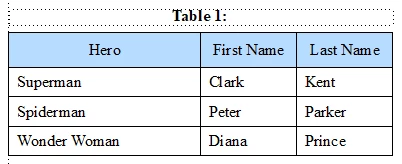
This topic has been closed for replies.
Correct answer frameexpert

OK, I will tell you my philosophy of developing scripts. For each task, I almost always work with selections. I want to test each piece of my code on a selection if I can. So here, I am don't want to do two things (create a table, then fill it); I only want to test filling a table. So I insert a table, click in the table and test my code.

After I develop and test all of my individual tasks, then I worry about putting the pieces together. I will typically make a function for each task to facilitate troubleshooting and reuse.

This methodology has helped me develop thousands of commercial scripts and compile hundreds of reusable functions.

1 reply

frameexpert
Community Expert
Community Expert
July 17, 2019

There are a lot of ways you can do this, but here is one way:

#target framemaker

var hero = ['Superman', 'Spiderman', 'Wonder Woman'];

var fName = ['Clark', 'Peter', 'Diana'];

var lName = ['Kent', 'Parker', 'Prince'];

var doc, tbl, row, cell, textLoc;

doc = app.ActiveDoc;

// Click in the table before running this.

tbl = doc.SelectedTbl;

// Populate the heading row.

row = tbl.FirstRowInTbl;

cell = row.FirstCellInRow;

while (cell.ObjectValid () === 1) {

    textLoc = new TextLoc (cell.FirstPgf, 0);

    if (cell.CellColNum === 0) {

        doc.AddText (textLoc, "Hero");

    }

    else if (cell.CellColNum === 1) {

        doc.AddText (textLoc, "First Name");

    }

    else if (cell.CellColNum === 2) {

        doc.AddText (textLoc, "Last Name");

    }

    cell = cell.NextCellInRow;

}

// Populate the body rows.

row = row.NextRowInTbl;

cell = row.FirstCellInRow;

while (cell.ObjectValid () === 1) {

    if (cell.CellColNum === 0) {

        populateColumn (cell, hero, doc);

    }

    else if (cell.CellColNum === 1) {

        populateColumn (cell, fName, doc);

    }

    else if (cell.CellColNum === 2) {

        populateColumn (cell, lName, doc);

    }

    cell = cell.NextCellInRow;

}

function populateColumn (cell, list, doc) {


    var counter, textLoc;


    counter = 0;

    while (cell.ObjectValid () === 1) {

        textLoc = new TextLoc (cell.FirstPgf, 0);

        doc.AddText (textLoc, list[counter]);

        counter = counter + 1;

        if (counter === list.length) {

            break;

        }

        cell = cell.CellBelowInCol;

    }

}

www.frameexpert.com
Gene Sorg
Gene SorgAuthor
Participant
July 17, 2019

Wow. More complicated than I thought. One initial question, since I am trying to create a new table and then modify that table from within the same script, the following does not make sense.

doc = app.ActiveDoc; 

// Click in the table before running this.

tbl = doc.SelectedTbl; 

frameexpert
Community Expert
frameexpertCommunity ExpertCorrect answer
Community Expert
July 18, 2019

OK, I will tell you my philosophy of developing scripts. For each task, I almost always work with selections. I want to test each piece of my code on a selection if I can. So here, I am don't want to do two things (create a table, then fill it); I only want to test filling a table. So I insert a table, click in the table and test my code.

After I develop and test all of my individual tasks, then I worry about putting the pieces together. I will typically make a function for each task to facilitate troubleshooting and reuse.

This methodology has helped me develop thousands of commercial scripts and compile hundreds of reusable functions.

www.frameexpert.com
