Inspiring
May 24, 2022
Answered

No Hyperlink for the First Topic in the TOC

  • May 24, 2022
  • 2 replies
  • 458 views

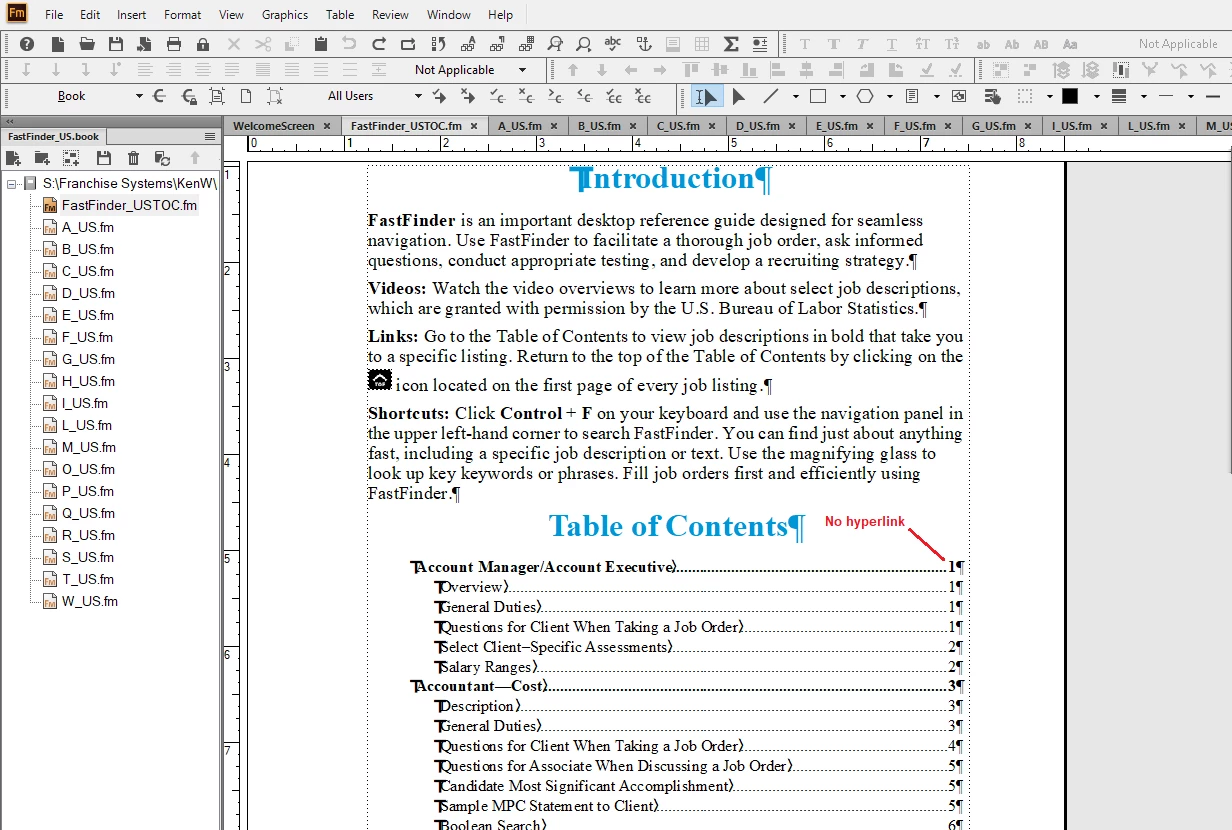
I have a document where the first topic in the TOC does not have a hyperlink. All of the other Heading1First topic listings have hyperlinks in FrameMaker, but the first topic doesn't. Ideas?



    This topic has been closed for replies.
    Correct answer Barb Binder

    To elaborate on Rick's answer: if a hypertext marker is in a paragraph without any character styles assigned, the entire paragraph is clickable. But if there is a character style within that paragraph, that's going to change which part of the paragraph can be clicked. Select the heading, assign Default ¶ Font in the Character catalog and update the book.


    ~Barb

    2 replies

    Barb Binder
    Community Expert
    Barb BinderCommunity ExpertCorrect answer
    Community Expert
    May 24, 2022

    To elaborate on Rick's answer: if a hypertext marker is in a paragraph without any character styles assigned, the entire paragraph is clickable. But if there is a character style within that paragraph, that's going to change which part of the paragraph can be clicked. Select the heading, assign Default ¶ Font in the Character catalog and update the book.


    ~Barb

    ~Barb at Rocky Mountain Training
    Inspiring
    May 24, 2022

    Thanks Barb.  There was a character property in the TOC for that entry.  I had already done what you said before I read your comment.  I went to the entry, highlighted the TOC entry, and click on Default Paragraph Font and updated, but the character property didn't go away.

    frameexpert
    Community Expert
    Community Expert
    May 24, 2022

    Are there any character property changes in the first heading?

    Inspiring
    May 24, 2022

    Thanks Rick.  There was a character property there.  I highlighted the TOC entry and changed to Default Para Font and updated the book, but it did not get rid of the property.  Ideas?

    Bob_Niland
    Community Expert
    Community Expert
    May 24, 2022

    Any chance the heading contains a variable which has a Character Format in its definition?


    Anyway, another way to avoid the problem is to make sure that the Character Format in question is not present in the Character Catalog for the TOC file.


    If the whole thing is due to a legacy code-page overly workaround for a needed glyph, see if you can use Unicode, and delete the Character Format everywhere.