
Inspiring
February 1, 2023
Question

"No master pages applies because the MasterPageMaps table contains no mapping information."

  • February 1, 2023
  • 3 replies
  • 487 views

I want to apply a master page that I have created and used in an .fm file, but when I update my book, my Book Error Report says "No master pages applies because the MasterPageMaps table contains no mapping information."  Does anyone have an idea why?  What can I do to fix this problem?  Please share.  Thanks!

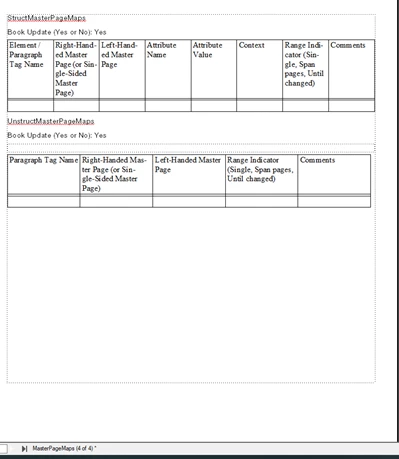
In the Reference Pages for the .fm file, here's what the MasterPageMaps tables look like:


    This topic has been closed for replies.

    3 replies

    Barb Binder
    Community Expert
    Community Expert
    February 2, 2023

    Hi @Brian26375051l7h5L:


    FrameMaker offers two ways to apply custom master pages. Manually, using Format > Page Layout > Master Page Usage, or automatically by attaching a master page to a paragraph style, and filling out the table on the reference page and then choosing Format > Page Layout > Apply Master Pages. 


    I'm thinking you just need to choose Format > Page Layout > Master Page Usage. If you would like to learn more about the automatic application of custom master pages, this post may be helpful:
    https://www.rockymountaintraining.com/adobe-framemaker-automatically-assigning-custom-master-pages/


    ~Barb

    ~Barb at Rocky Mountain Training
    Inspiring
    February 2, 2023

    Thanks for all of the responses.  I have fixed this problem by looking at Master Pages that have worked, and from their Reference Pages, copying data into the bottom rows in each MasterPageMaps table.  I have also created Master Pages that match the names called out in those bottom rows.


    New problem:  I'm now trying to get a frame on a Portrait Master Page to become Landscape.  I'm looking at this page: Adobe FrameMaker: Adding a Landscape Page to a Portrait Document – Rocky Mountain Training, written by Barb!  It's a little different from what I am trying to do, because I only want to rotate a frame within a page, not the whole page.  Strangely, my Graphics > Object Properties window is totally blank.  I don't know why.

    I'm continuing to play around to try and get it to work.   Thanks again for your help everyone!


    Bob_Niland
    Community Expert
    Community Expert
    February 2, 2023

    Yeah, the Graphical object properties don't seem to apply.

    Select text frame.
    Format » Customize Layout » Customize Text Frame
    You may want to do this as a new {L/R pair} of Master Pages, mapped by AMP.

    Bob_Niland
    Community Expert
    Community Expert
    February 1, 2023

    If you want to use the Apply Master Pages option in Update Book, or use
    Format » Page Layout » Apply Master Pages…

    1.  Reference Page MasterPageMaps has to exist (in all .fm files of the book, which it doesn't by default), and 
    2. The UnstructMasterPageMaps table needs to identify at least some of the Paragraph Formats used in each file.

    It looks like for at least one .fm file, you have the MPM RefPg, but it's got two(!) UMPM Tables, and neither has any useful content.

    In addition to populating one of those tables, the other might be deleted, as I have no guesses as to the consequence of the extra table.

    frameexpert
    Community Expert
    Community Expert
    February 1, 2023

    You either have to add an entry to the table or uncheck the Apply Master Pages checkbox when you update the book.