
Inspiring
Nov 13, 2026 1:35 PM UTC
Answered

Nothing happens when I use the zoom menu tool
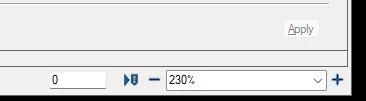
 

The menu I am talking about is the one above (I don’t know what it’s called in English).

This has happened a couple of times before, but when I close a file and open a new one, the problem is gone. Today though, it has been like this for almost all the day. It doesn’t matter what zoom level I choose, nothing happens. I have found View / Zoom and then I can choose smaller, default or larger. But I have to do this several times to get close to the result I want.


Anybody else with this problem? Is there another way to get to the % I want?
    Barb Binder
    Barb BinderCorrect answer
    Community Expert
    Nov 14, 2026 2:52 AM UTC

    Hi ​@Lena27020170w3wy:

    Yes, I see this as a regular bug in class (so on numerous computers and on many versions and patches) and have for years.

    Most of the time, when you select a magnification from the Zoom menu, FrameMaker closes the menu and executes the requested magnification. Other times, it leaves the choice active in the text box and you have to press Enter for it to work. I just teach my students to press Enter when it ignores them and move on. 

    You can bypass the Zoom menu altogether with the following (sequential) shortcuts:

    • Esc z z zooms to 100%
    • Esc z p zooms to page
    • Esc z i zooms in once
    • Esc z o zooms out once

    See https://help.adobe.com/en_US/framemaker/using/using-framemaker/user-guide/WSd817046a44e105e21e63e3d11ab7f7862b-7fc0_ver12.0.html

    Typing any number between 25 and 1600 into the text box and pressing Enter will zoom you to that exact magnification.

    ~Barb at Rocky Mountain Training

    6 replies

    Barb Binder
    Community Expert
    Barb BinderCommunity ExpertCorrect answer
    Community Expert
    Nov 14, 2026 2:52 AM UTC

    Hi ​@Lena27020170w3wy:

    Yes, I see this as a regular bug in class (so on numerous computers and on many versions and patches) and have for years.

    Most of the time, when you select a magnification from the Zoom menu, FrameMaker closes the menu and executes the requested magnification. Other times, it leaves the choice active in the text box and you have to press Enter for it to work. I just teach my students to press Enter when it ignores them and move on. 

    You can bypass the Zoom menu altogether with the following (sequential) shortcuts:

    • Esc z z zooms to 100%
    • Esc z p zooms to page
    • Esc z i zooms in once
    • Esc z o zooms out once

    See https://help.adobe.com/en_US/framemaker/using/using-framemaker/user-guide/WSd817046a44e105e21e63e3d11ab7f7862b-7fc0_ver12.0.html

    Typing any number between 25 and 1600 into the text box and pressing Enter will zoom you to that exact magnification.

    Translate
    ~Barb at Rocky Mountain Training
    Inspiring
    Nov 16, 2026 5:59 AM UTC

    Thank you!

    Translate
    Community Expert
    Nov 13, 2026 3:12 PM UTC

    Hi Lena,

    The default zoom levels are set in the maker.ini.

    You have two maker.ini files:

    c:\Program Files\Adobe\Adobe FrameMaker 2026\maker.ini (this is the default ini file with all settings)

    c:\Users\<yourname>\AppData\Roaming\Adobe\FrameMaker\18\maker.ini (this is the ini file with your changes)

    Close FrameMaker.

    In the maker.ini in the Program Files folder search for Zoom.

    The line will be probably like this:

    Zoom=25, 50, 80, 100, 120, 140, 150, 160, 200, 400

    Copy this line. Open the maker.ini in your AppData folder and add this line at the end of the [Preferences] section.

    Change the zoom levels as you like and close both maker.ini files.

    Klaus Daube had described all these maker.ini settings here: https://www.daube.ch/docu/fmaker65.html

    However, this does not explain, why you cannot change the zoom level. I would restart Windows and see, if this helps.

    To change the zoom level quickly, press CTRL and scroll with the scroll wheel on your mouse.

    Best regards, Winfried


    Translate
    Inspiring
    Nov 16, 2026 5:58 AM UTC

    The settings are exactly as I want them. It’s just that nothing happens sometimes when I try to change. But thank you for the tip about Ctrl and the mousewhel!

    Translate
    Jeff_Coatsworth
    Community Expert
    Community Expert
    Nov 13, 2026 1:48 PM UTC

    Are you changing the Zoom value for each document each time you open them or just setting a default to be used for all documents? If it is the latter, I think you can save that in a Workspace definition.

    Translate
    Inspiring
    Nov 13, 2026 1:53 PM UTC

    I have set the % I want to be able to choose from. If I work in a document I use the setting 230 %. But sometimes I want an overview and then I use Fit to page. I use other % too. I din’t know you can use a default setting, right now each file opens in the % it was when I saved it last. I just change it to what I want at the moment. But not now, now nothing happens at all.


    PS. Now it’s time for weekend here in Sweden, so that’s why I am not replying anymore today 😁

    Translate