Known Participant
October 26, 2016
Answered

Numbered order wrong after numbered Notes

  • October 26, 2016
  • 1 reply
  • 745 views

Hi,

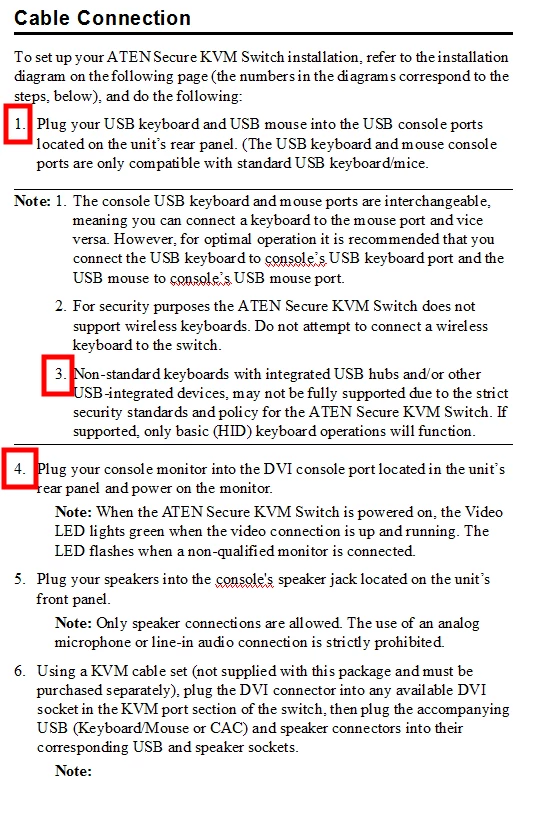
Can someone explain why this is happening - after I create a Note with numbers under a numbered step (see image below), the next numbered step follows the last number in the Note section. Instead of being Step number 2, its going to Step number 4, following the numbers in the Notes and not the Numbered1+.

Help!

    This topic has been closed for replies.
    Correct answer jaggedpeak

    So would I have to change all the Numbered items to  R:xxx 

    Correct?


    All the ones that should be following the same numbering pattern, yes.

    I'm guessing that Numbered2 is an indent from Numbered 1 (e.g. Numbered1 would be 1, 2, etc, and Numbered 2 would be a, b etc.)

    Not sure how the other Numbered formats are used, so they might be the same series, or different (as is the case for the 'Note' formats).

    1 reply

    jaggedpeak
    Inspiring
    October 26, 2016

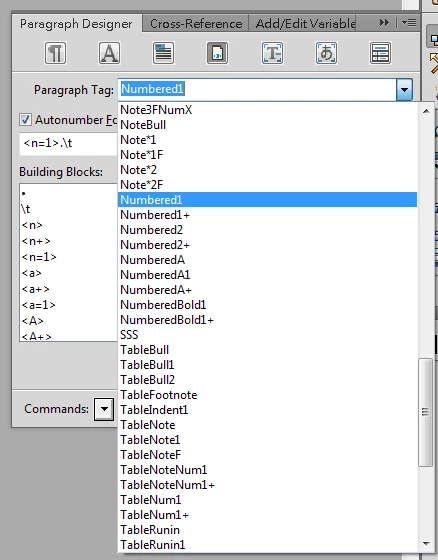
    Can you post the Autonumber Format you're using for both paragraph styles? (4th tab of the Paragraph Designer)

    Known Participant
    October 26, 2016

    and

    Oh crap, this doesn't look good...

    jaggedpeak
    Inspiring
    October 26, 2016

    For your numbered lists, you should put 'series labels' in the autonumber format.

    Since you're managing two discrete types of numbered lists, I believe you would need different series labels.

    No idea which Frame version you're using, but the details haven't changed (afaik) from: Adobe FrameMaker 9 * Lists and autonumbering

    In your case, you could make the formats (for example):

    R:<n+>.\t

    and

    S:<n+>.\t