



TCBill
Inspiring
Oct 30, 2023 5:57 PM UTC
Answered

Numbering in paragraph style won't bold

Hello. I have a book with several chapters. I have set the footer numbering to be bold and it works in all but one of my documents (see below.) I have tried reworking the paragraph style in just the one offending document and, while the paragraph designer shows everything the way I want it to be, the actual footer isn't correct.  FM version 17.02.431, font used is Arial.
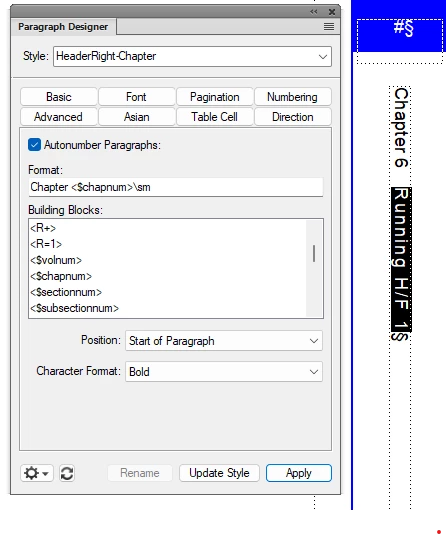
I have even tried deteting the footer frame and recreating it, to no avail.


Thanks is advance for your help.

Bill

    This topic is closed to new replies. Start a new post to keep the conversation going.
    Winfried RengCorrect answer
    Community Expert
    Oct 30, 2023 7:05 PM UTC

    Hi Bill,

    When you assign the correct character format, I would assume that something with the setting of this character format is not correct. You can either just import the character formats from a working file. Or you can click outside of any text frame and then check the character format properties. Then only the changed properties are shown and not those of the current paragraph format.

    Best regards, Winfried

    5 replies

    Matt-Tech Comm Tools
    Community Expert
    Community Expert
    Oct 30, 2023 11:21 PM UTC

    Please post a shot of the settings for Bold in the Character Designer

    Translate
    -Matt Sullivan, FrameMaker Course Creator, Author, Trainer, Consultant
    Bob_Niland
    Community Expert
    Community Expert
    Oct 30, 2023 7:31 PM UTC

    What is the Weight attribute of Character Format "Bold"?

    Does the font in use for the footer have a Bold instance?
    And if the Weight is "Bolded", all sorts of new questions arise.

    Translate
    Winfried RengCommunity ExpertCorrect answer
    Community Expert
    Oct 30, 2023 7:05 PM UTC

    Hi Bill,

    When you assign the correct character format, I would assume that something with the setting of this character format is not correct. You can either just import the character formats from a working file. Or you can click outside of any text frame and then check the character format properties. Then only the changed properties are shown and not those of the current paragraph format.

    Best regards, Winfried

    Translate
    TCBill
    TCBillAuthor
    Inspiring
    Oct 31, 2023 11:25 AM UTC

    Hello Winfried,

    Thank you and everyone else for your help. I imported the character formats from another document that does work and of course it everything fell into place. (I was buffaloed because I had previously repeatedly imported just the paragraph style.)  In a way I regret not doing any further troubleshooting to learn the cause, but "time is money," as they say. 

    Translate
    Community Expert
    Oct 31, 2023 12:11 PM UTC

    Hi Bill,

    Very good that you found the cause of your issue!

    Have a good day!

    Translate