
Known Participant
March 26, 2021
Question

Numbering Issues

  • March 26, 2021
  • 3 replies
  • 517 views

Hi all. This is driving me nuts and the document is due on Monday.


Heres the problem: In the original document (2014 vesrion), the numbering for SCRs in the table is fine, i.e., the numbering starts where it should at 1.1.
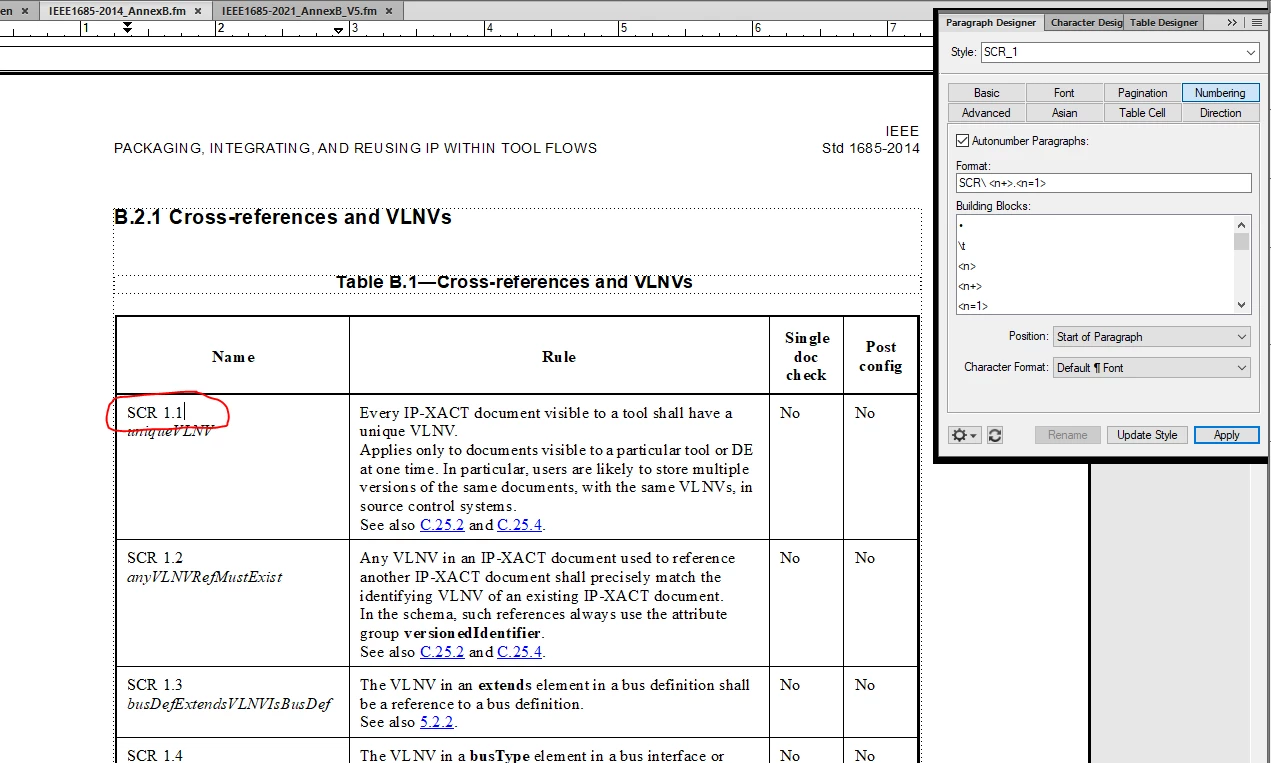
 

However, in the 2021 version of the same document, the numbering for the SCRs in the table is off, i.e., the numbering starts at 7.1.
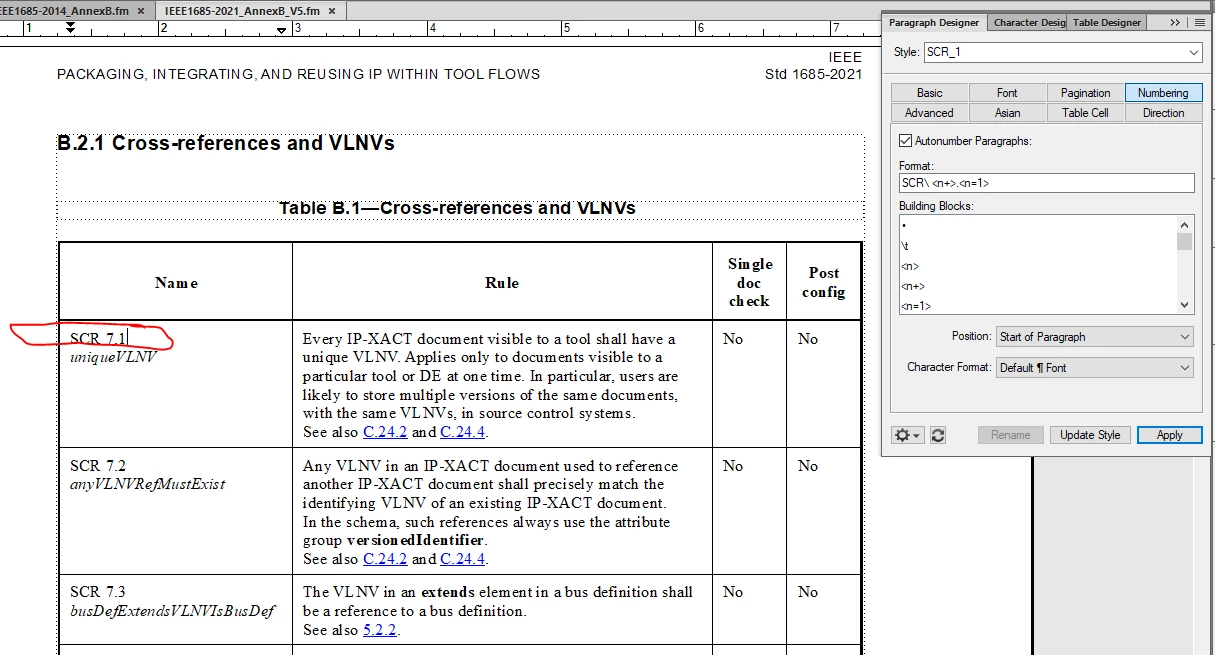
I've checked the Numbering in the Paragraph Deisgner and both are the same. Help!


Cheers -- John

    This topic has been closed for replies.

    3 replies

    Barb Binder
    Community Expert
    Community Expert
    March 26, 2021

    Hi John:


    SCR has an unnamed numbered series in this document and I believe your book is set up to increment the paragraph numbers from the previous file in book. The table starts with a 7 because it is continuing from a previous file.


    We talked about cleaning up your lists after this goes to print, so for now, just add < =0> to the CellHeading at the top of the table, and click Apply (not Update Style). This is a quick fix that will let you meet your deadline, but is not a good long-term solution.


    ~Barb 


    ~Barb at Rocky Mountain Training
    K.Daube
    Community Expert
    Community Expert
    March 26, 2021

    Keypoint for consistent numbering is the series label. For example, for Headings the usual scheme is

    H:<n+>.< =0>< =0>                Level 1
    H:<n>.<n+>< =0>                  Level 2
    H:<n>.<n>.<n+>.                  Level 3

    The sequence label here is H:

    You do not have such a label and hence the numbering is ruined by some arbitrary numbered list.

    See https://www.daube.ch/docu/files/compendium.pdf#page=119 

    johnb3665Author
    Known Participant
    March 26, 2021

    Hi K.Daube. Thx for your response.

    Well, now I know what to do in the future but how can I solve my immediate
    problem? Is there a way to look at the "SCR" series throughout the book to
    see where the numbering went astray?

    In general, how can I see the series and number systems used throughout the
    entire book?

    Cheers and thx. -- John
    [PII removed by moderator]

    LinSims
    Community Expert
    Community Expert
    March 26, 2021

    Assuming you have a separate paragraph tag that is just for numbering the SCRs, edit the autonumbering sequence in one file to include a series label and then import your paragraph tags to the other files.


    After that, make sure your document numbering is set correctly for chapter/paragraph numbers at both the document and book level.


    If you have tags with the same names but different properties that you don't want to overwrite, copy a correctly numbered paragraph into a blank document, then save as MIF and edit the MIF file in a text editor to remove all but the Paragraph Catalog that contains the definition for just the one tag. Save the MIF file, open it in FrameMaker, and import paragraph tags from it. That guarantees you only import the tag you want to change.


    For example, if I wanted to import the definition for JUST the A Anchor tag, my edited MIF file would look like this:


    <MIFFile 2020> # Generated by FrameMaker 2020
    # Options:
    #    Paragraph Text
    #    Paragraph Tags
    #    Paragraph Formats
    #    Font Information
    #    Markers
    #    Anchored Frames
    #    Tables
    #    Graphics and TextRect Layout
    #    Master Page Items
    #    Condition Catalog
    #    Table Catalogs
    #    Font Catalog
    #    Paragraph Catalog
    #    Document Template
    #    Document Dictionary
    #    Variables
    #
    <PgfCatalog 
     <Pgf 
      <PgfTag `A Anchor'>
      <PgfUseNextTag Yes>
      <PgfNextTag `B1 Body 1'>
      <PgfAlignment Left>
      <PgfFIndent  0.0">
      <PgfLIndent  0.0">
      <PgfRIndent  0.0">
      <PgfFIndentRelative No>
      <PgfFIndentOffset  0.0">
      <PgfTopSeparator `'>
      <PgfTopSepAtIndent No>
      <PgfTopSepOffset  0.0">
      <PgfBotSeparator `'>
      <PgfBotSepAtIndent No>
      <PgfBotSepOffset  0.0">
      <PgfPlacement Anywhere>
      <PgfPlacementStyle Normal>
      <PgfRunInDefaultPunct `'>
      <PgfSpBefore  0.0 pt>
      <PgfSpAfter  -2.0 pt>
      <PgfWithPrev Yes>
      <PgfWithNext Yes>
      <PgfBlockSize 2>
      <PgfFont 
       <FTag `'>
       <FPlatformName `W.Open Sans.R.400'>
       <FFamily `Open Sans'>
       <FVar `Regular'>
       <FWeight `Regular'>
       <FAngle `Regular'>
       <FEncoding `FrameRoman'>
       <FSize  2.0 pt>
       <FUnderlining FNoUnderlining>
       <FOverline No>
       <FStrike No>
       <FChangeBar No>
       <FOutline No>
       <FShadow No>
       <FPairKern Yes>
       <FTsume No>
       <FCase FAsTyped>
       <FPosition FNormal>
       <FDX  0.0%>
       <FDY  0.0%>
       <FDW  0.0%>
       <FStretch  100.0%>
       <FLanguage USEnglish>
       <FLocked No>
       <FSeparation 0>
       <FColor `Black'>
       <FBackgroundColor NoColor>
      > # end of PgfFont
      <PgfLineSpacing Proportional>
      <PgfLeading  -1.0 pt>
      <PgfAutoNum No>
      <PgfNumTabs 0>
      <PgfHyphenate No>
      <HyphenMaxLines 2>
      <HyphenMinPrefix 3>
      <HyphenMinSuffix 3>
      <HyphenMinWord 5>
      <PgfLetterSpace No>
      <PgfMinWordSpace 90>
      <PgfOptWordSpace 100>
      <PgfMaxWordSpace 110>
      <PgfMinJRomanLetterSpace 0>
      <PgfOptJRomanLetterSpace 25>
      <PgfMaxJRomanLetterSpace 50>
      <PgfMinJLetterSpace 0>
      <PgfOptJLetterSpace 0>
      <PgfMaxJLetterSpace 10>
      <PgfYakumonoType Floating>
      <PgfAcrobatLevel 0>
      <PgfPDFStructureLevel 0>
      <PgfLanguage USEnglish>
      <PgfCellAlignment Middle>
      <PgfCellMargins  0.0 pt -6.0 pt 0.0 pt 0.0 pt>
      <PgfCellLMarginFixed No>
      <PgfCellTMarginFixed No>
      <PgfCellRMarginFixed No>
      <PgfCellBMarginFixed No>
      <PgfLocked No>
      <PgfBoxColor NoColor>
      <PgfAsianComposer No>
      <PgfDir INHERITLTR>
     > # end of Pgf
    > # end of PgfCatalog
    # End of MIFFile


    (And ignore any coloring you might see, it seems Khorus finally added colors for different code language, at least in edit mode, but this is just text. I wanted it visually distinct from the regular text of the answer.) 

    frameexpert
    Community Expert
    Community Expert
    March 26, 2021

    John, If you want to do a quick web meeting, please contact me offlist. There would be no cost for this. Thanks. rick at frameexpert dot com

    johnb3665Author
    Known Participant
    March 26, 2021

    Hi Rick. Appeciate the offer but today has turned into a Monday for me, i.e., crazy busy. Will circle around to you next week if I can't figure it out. Thx again. 

    frameexpert
    Community Expert
    Community Expert
    March 26, 2021

    OK, no problem. I think we could figure it out quickly if I can look at it.