Participant
April 14, 2025
Answered

Numbering Properties / Chapter
  • April 14, 2025
  • 2 replies
  • 472 views

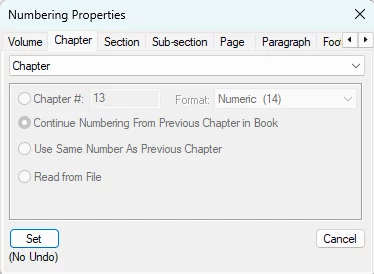
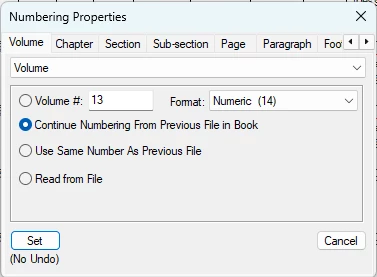
1.) Numbering Properties / Chapter, from the Volume Tab> enter Volume # 13 (image 1)

2.) Select the Continue Numbering From Previous Chapter in Book, rodio button. (image 1)

3.) Select the, Set (No Undo) button. (image 1)

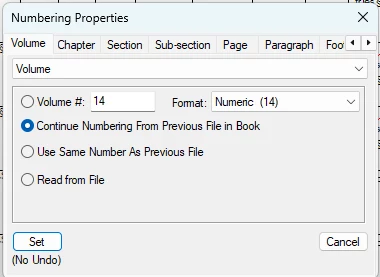
4.) From the Chapter tab, this sets the #13 into the Chapter # entry box. (image 2)

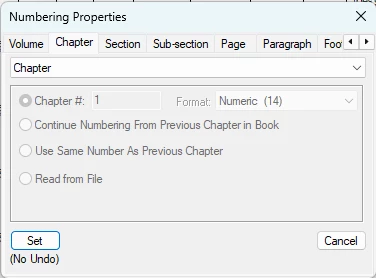
Now when I try to do this on #14 the Chapter tab sets #1 into the Chapter # entry box. This should be #14. Any help would be appreciated.

    Correct answer frameexpert

    Folder do not allow the user to set Chapter Numbering but Groups do.

    I had Folders in my book that did not allow me to set Chapter Numbering.

    Instead of Folders I am now using Groups.


    From the FrameMaker help; see the bolded sentence:

    Book Groups

    You can create groups in a book file. Like folders, groups are also logical containers in a book file; they do not exist on the disk. The difference between a group and a folder is that a group does not change the hierarchy of the files within it. Also you cannot set up numbering styles for a group.


    For example, the chapter number increments sequentially if the chapter is in a group. For files organized under a folder, the chapter number remains the same but the section number can increment sequentially. You cannot explicitly change the chapter number for files in a folder as the files inherit this property from the folder.

    2 replies

    Jeff_Coatsworth
    Community Expert
    Community Expert
    April 14, 2025

    I suspect you're getting Chapter & Volume confused here, but Rick will be able to straighten you out.

    frameexpert
    Community Expert
    Community Expert
    April 14, 2025

    Can you jump on a meeting so I can take a look? Email me offlist at rick at frameexpert dot com.

    Participant
    April 14, 2025

    yes


    Participant
    April 14, 2025

    [PII removed by moderator - use Private Messages to send email info]