


Participant
December 20, 2015
Answered

Numbers in TOC when publishing DITA in HTML5

  • December 20, 2015
  • 2 replies
  • 468 views

Hello,

Very new to FrameMaker. I’m trying to publish a ditamap in Responsive HTML5 in FM 2015. When I do, the TOC is numbered (see image). The numbers don’t appear in a PDF file. Does anyone know how I can turn off this option? I can’t find it in the settings. I feel like there should be a simple solution.
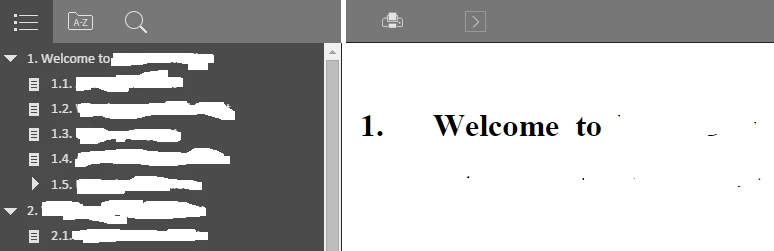


Thank you!

This topic has been closed for replies.
Correct answer Stefan Gentz

Yes, you can exclude auto-numberings from FrameMaker paragraph styles in the HTML5 output:

  1. Open the Publish Pod from > File >Publish.
  2. Select "Responsive HTML5".
  3. Right click on "Responsive HTML5" and select "Edit Settings".
  4. Open the "Style Mapping" tag.
  5. Select the paragraph style you want to edit (e.g. "Heading 1").
  6. Set "Autonumber:" to "Ignore".
  7. Click "Save and Close".
  8. Republish.

This should do the trick.

Please also see the FrameMaker 2015 Online Help article on this setting here.

Let us know if it worked for you :-)

2 replies

Stefan GentzCorrect answer
Legend
December 20, 2015

Yes, you can exclude auto-numberings from FrameMaker paragraph styles in the HTML5 output:

  1. Open the Publish Pod from > File >Publish.
  2. Select "Responsive HTML5".
  3. Right click on "Responsive HTML5" and select "Edit Settings".
  4. Open the "Style Mapping" tag.
  5. Select the paragraph style you want to edit (e.g. "Heading 1").
  6. Set "Autonumber:" to "Ignore".
  7. Click "Save and Close".
  8. Republish.

This should do the trick.

Please also see the FrameMaker 2015 Online Help article on this setting here.

Let us know if it worked for you :-)

meggiemayAuthor
Participant
December 20, 2015

Thank you very much! That worked